我们发现了什么
# ToDo 一款供个人及其 AI 智能体使用的自托管待办事项看板,个人可将工作交给这些智能体。标题:GitHub - Axi404/todo:一款供个人及其 AI 智能体使用的自托管待办事项看板,个人可将工作交给这些智能体。URL 来源:https://github.com/Axi404/todo Markdown 内容:一款供个人及其 AI 智能体使用的自托管待办事项看板,个人可将工作交给这些智能体。
- 来源:GitHub(发现于 2026-11-05)
- 证据等级:D · 发现产品或需求信号,暂未获得可核验的商业证据。
- 商业模式:待核验
- 主题:独立产品
- 初筛评分:23/100 · 收录 1 次
证据,比故事更重要。
规则清洗与初筛,未经人工商业核验。原文语境、实际客户和付费情况仍需自行验证。
引用与数字披露
来源类型(原作者自述/第三方测算/媒体转引)需采集端标注,本版尚未落字段。
- 作者
- 未标注
- 抓取日期
- 来源类型
- 未标注
- 币种
- 未标注
- 口径
- 未标注
- 披露主体
- 未标注
- 披露日期
- 未标注
中文辅助译文(全文)
ToDo
一款供个人使用、并可将工作交给 AI 智能体处理的自托管待办看板。
在线演示(使用模拟数据;你的更改会保留在浏览器中)
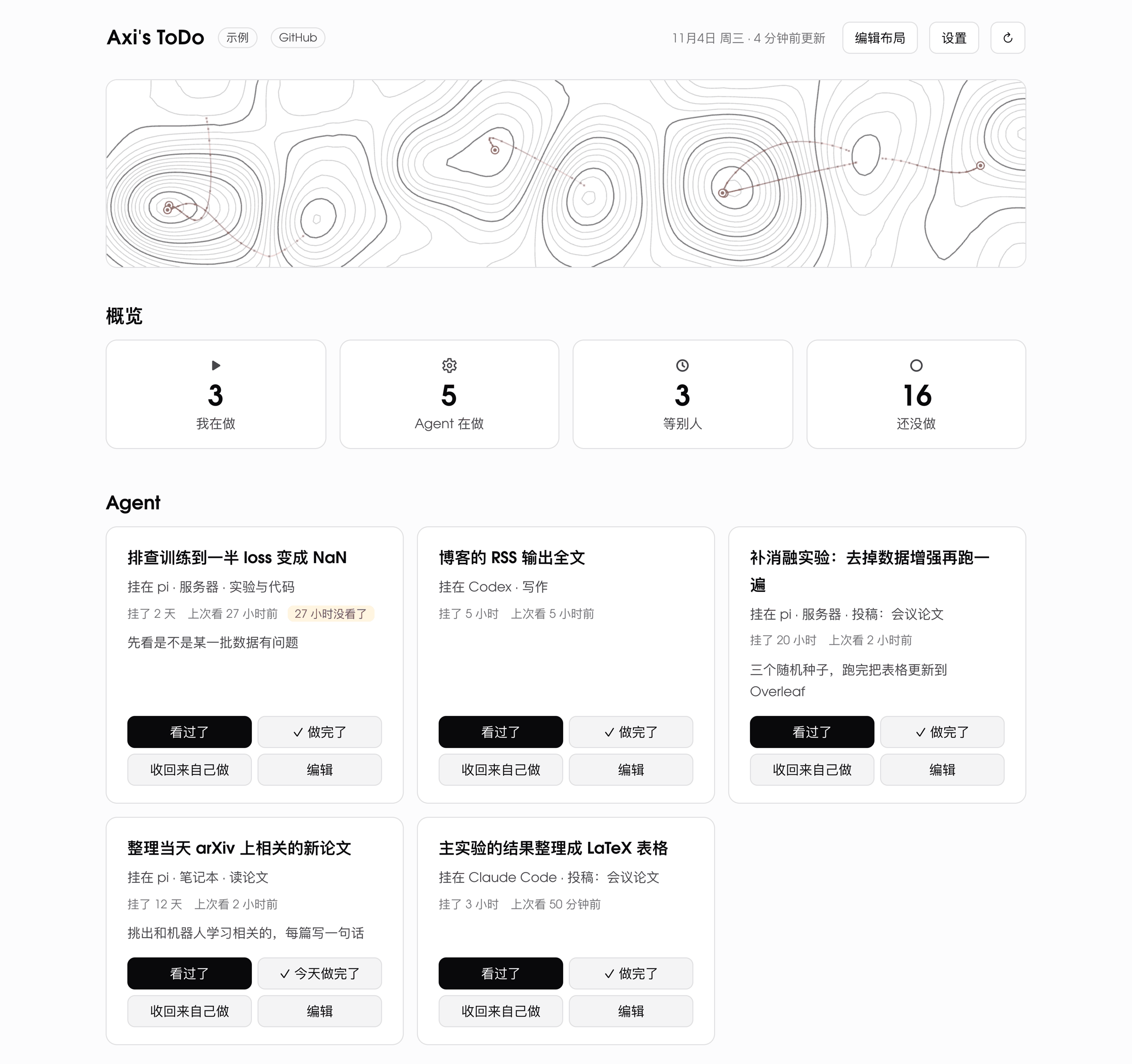 图注:显示带有模拟数据的待办看板。
除待办、进行中、等待中、已完成和已放弃外,条目还可以交给智能体处理。看板随后会记录智能体的运行位置、开始运行的时间,以及你上次查看它的时间;这些条目会列在顶部,最久未查看的排在最前面,并标记那些你已有一段时间没有查看的条目。
界面为中文。
功能
- 可在页面上排列的分区、卡片和条目;标题和备注支持行内 Markdown
- 支持每日签到、连续记录以及可选的每日周期切换时间的重复条目
- 截止日期(包括 AoE)和月历
- 已完成条目会在其卡片中保留数日,随后折叠收起;还可查看完成情况图表(两周柱状图或热力图)
- 事项完成或签到时的特效,以及页眉动画;均可选,并在系统要求减少动态效果时关闭
- 外观设置:浅色或深色、字体、字号、宽度、密度、布局、自定义 CSS
- 可选密码,以及可选的 Canvas LMS 作业同步功能
- JSON API,以及供智能体和脚本使用的小型客户端(
client.mjs) - 可在手机上使用
服务器仅使用 Node 标准库,包括其内置的 SQLite。前端采用 Preact 和 htm,以普通 ES 模块形式加载:无需安装,也无需构建。
运行
需要 Node 24 或更高版本。
git clone https://github.com/Axi404/todo.git
cd todo
node server.mjs
然后打开 http://127.0.0.1:4404。数据会写入 ./data/todo.db。
| 变量 | 默认值 | |
|---|---|---|
TODO_DIR | ./data | 数据目录 |
TODO_PORT | 4404 | 端口;服务器仅监听 127.0.0.1 |
TODO_PUBLIC_HOST | 反向代理背后的主机名,例如 todo.example.com;来自其他主机的请求以及从其他站点发送的更改都会被拒绝 | |
TODO_PASSWORD, TODO_SECRET | 要求输入密码;该密钥用于为登录 Cookie 签名 | |
CANVAS_HOST, CANVAS_TOKEN | 每三小时从 Canvas 同步作业 | |
TZ | 系统的 | 智能体签到条目时“今天”所代表的含义 |
数据
所有内容都位于数据目录中的一个 SQLite 文件 todo.db 内:看板、每次变更各有一条记录且注明变更内容及变更者的日志,以及 Canvas 同步状态。data.mjs 可从命令行在同一 TODO_DIR 中读写该文件:
node data.mjs export | 以 JSON 格式表示的看板,与 GET /api/todo 返回的内容相同 |
node data.mjs import <board.json> [--log <log.jsonl>] [--replace] | 载入看板及其日志(如果提供);未使用 --log 时日志保持不变;只有使用 --replace 才会替换已有条目的看板 |
node data.mjs markdown | 以 Markdown 格式表示的看板 |
node data.mjs log | 日志,每次变更对应一行 JSON |
请以服务器运行所用的用户身份运行它,以确保 SQLite 在 todo.db 旁创建的文件对服务器保持可写。
备份时,请导出看板和日志,或创建整个数据库的一致性副本,此方式在服务器运行时也可用:sqlite3 data/todo.db "VACUUM INTO 'backup.db'"。服务器运行时,仅复制 todo.db 本身不够:最新更改可能仍保存在旁边的 todo.db-wal 中。
API
GET /api/todo 返回看板。更改通过 core/edits.mjs 中列出的 POST、PATCH 和 DELETE 请求进行;每个请求都会返回更新后的看板。程序使用 X-Actor 请求头表明自身身份,该信息会写入日志;如果看板设有密码,则发送 Authorization: Bearer <password>。
client.mjs 为智能体和脚本封装了这些接口:
import { createClient } from "./client.mjs";

const todo = createClient({ url: "https://todo.example.com", passwordFile: "/path/to/password", actor: "agent" });
console.log(await todo.status()); // a plain-text summary of the board
await todo.set({ item: "weekly report", status: "agent", where: "my laptop" });
await todo.add({ group: "work", title: "Read the review" });
Canvas
设置 CANVAS_HOST(例如 canvas.instructure.com)并将访问令牌填入 CANVAS_TOKEN 后,服务器会每三小时读取一次你的课程作业,也会在你按下同步按钮时读取。仍处于开放状态的作业会按截止日期转换为条目,并放入你在设置中选择的一张卡片。已提交的作业会标记为完成。你自己的编辑绝不会被覆盖,你删除的条目也不会再次导入。看板只从 Canvas 读取数据,绝不向其写入。
演示站点
node demo/build.mjs <dir> 会生成一份包含模拟数据的看板静态副本。它完全在浏览器中运行:无需服务器,不发出请求,重新加载后更改会消失。在线演示采用这种方式构建。
部署
deploy/ 会通过 ssh 将看板安装到使用 nginx 的 Debian 或 Ubuntu 服务器上。将 deploy/deploy.env.example 复制为 deploy/deploy.env 并填写其中内容。然后运行一次 zsh deploy/setup.sh,并在每次发布时运行 zsh deploy/deploy.sh。每次发布都会放入各自的目录,如果无法启动,就会回滚。服务以独立用户身份运行,代码为只读,nginx 会获得一张 Let's Encrypt 证书。运行 zsh deploy/demo.sh setup,然后运行 zsh deploy/demo.sh,会以同样方式处理演示站点。
开发
node --test test/*.test.mjs:针对数据层及其存储、API、登录和客户端的检查node dev/test-board.mjs、dev/test-heroes.mjs、dev/test-demo.mjs、dev/test-canvas-sync.mjs:驱动无头 Chrome 的检查(如果 Chrome 不在 macOS 默认位置,请设置CHROME)node dev/snapshot.mjs:在不应改变看板外观的变更前后,对截图和页面结构进行比较
server.mjs、server/ | HTTP:主机和来源检查、登录、静态文件、API |
core/ | 数据层:存储、条目、卡片和分区、位置、Markdown 副本 |
data.mjs | 命令行中的数据操作:导出、导入、Markdown、日志 |
web/ | 前端;页眉动画位于 web/lib/heroes/(见其 README),特效位于 web/lib/fx/ |
canvas/、canvas-sync.mjs | Canvas 同步 |
client.mjs | API 客户端 |
demo/ | 演示站点 |
deploy/ | 部署 |
dev/、test/ | 检查 |
许可证
MIT。此处包含的第三方代码和字体保留各自许可证:web/vendor/ 中的 Preact(MIT)和 htm(Apache-2.0),以及 web/fonts/ 中的 Adventor Todo 字体(GUST Font License)。
译文由上游机器翻译生成,可能有误;判断请以英文原文为准。
英文原文(来源本站未改写)
ToDo
A self-hosted to-do board for one person and the AI agents they hand work to.
Live demo (made-up data; your changes stay in your browser)
Besides to do, doing, waiting, done and dropped, an item can be handed to an agent. The board then records where the agent runs, since when, and when you last checked on it; it lists these items at the top, least recently checked first, and flags the ones you have not looked at for a while.
The interface is in Chinese.
Features
- Sections, cards and items that you arrange on the page;inline Markdown in titles and notes
- Recurring items with daily check-ins, streaks, and an optional time at which their day rolls over
- Due dates, including AoE, and a month calendar
- Done items stay in their card for a few days, then fold away;a chart of what got done (two weeks of bars, or a heatmap)
- Effects when something is done or checked in, and animations in the header;
all optional, and off when the system asks for reduced motion
- Appearance settings: light or dark, font, size, width, density, layout, custom CSS
- An optional password, and optional sync of assignments from Canvas LMS
- A JSON API, and a small client (client.mjs) for agents and scripts
- Works on phones
The server uses only Node's standard library, including its built-in SQLite. The frontend is Preact with htm, loaded as plain ES modules: nothing to install, nothing to build.
Run it
Needs Node 24 or later.
git clone https://github.com/Axi404/todo.git
cd todo
node server.mjs
Then open http://127.0.0.1:4404. The data goes to ./data/todo.db.
| Variable | Default | |
|---|---|---|
TODO_DIR | ./data | data directory |
TODO_PORT | 4404 | port; the server listens on 127.0.0.1 only |
TODO_PUBLIC_HOST | the host name behind a reverse proxy, e.g. todo.example.com; requests for other hosts, and changes sent from other sites, are refused | |
TODO_PASSWORD, TODO_SECRET | ask for a password; the secret signs the login cookie | |
CANVAS_HOST, CANVAS_TOKEN | sync assignments from Canvas every three hours | |
TZ | the system's | what "today" means when an agent checks an item in |
Data
Everything is in one SQLite file in the data directory, todo.db: the board, a log with one entry per change saying what changed and who changed it, and the state of the Canvas sync. data.mjs reads and writes it from the command line, in the same TODO_DIR:
node data.mjs export | the board as JSON, as GET /api/todo returns it |
node data.mjs import <board.json> [--log <log.jsonl>] [--replace] | load a board, and its log if given (without --log the log stays as it is); a board that already has items is only replaced with --replace |
node data.mjs markdown | the board as Markdown |
node data.mjs log | the log, one JSON line per change |
Run it as the user the server runs as, so the files SQLite creates next to todo.db stay writable for the server.
To back up, export the board and the log, or make a consistent copy of the whole database, which works while the server runs: sqlite3 data/todo.db "VACUUM INTO 'backup.db'". Copying todo.db itself is not enough while the server runs: the latest changes may still be in todo.db-wal next to it.
API
GET /api/todo returns the board. Changes are the POST, PATCH and DELETE requests listed in core/edits.mjs; each returns the updated board. Programs say who they are with an X-Actor header, which goes into the log, and send Authorization: Bearer <password> if the board has one.
client.mjs wraps this for agents and scripts:
import { createClient } from "./client.mjs";

const todo = createClient({ url: "https://todo.example.com", passwordFile: "/path/to/password", actor: "agent" });
console.log(await todo.status());                                  // a plain-text summary of the board
await todo.set({ item: "weekly report", status: "agent", where: "my laptop" });
await todo.add({ group: "work", title: "Read the review" });
Canvas
With CANVAS_HOST (for example canvas.instructure.com) and an access token in CANVAS_TOKEN, the server reads your courses' assignments every three hours, and whenever you press the sync button. Assignments that are still open become items with their due dates, in a card you choose in the settings. Submitted ones are marked done. Your own edits are never overwritten, and items you delete are not imported again. The board only reads from Canvas, never writes.
Demo site
node demo/build.mjs <dir> writes a static copy of the board with made-up data. It runs entirely in the browser: no server, no requests, and changes are gone after a reload. The live demo is built this way.
Deploying
deploy/ installs the board on a Debian or Ubuntu server with nginx, over ssh. Copy deploy/deploy.env.example to deploy/deploy.env and fill it in. Then run zsh deploy/setup.sh once, and zsh deploy/deploy.sh for every release. Each release goes into a directory of its own and is rolled back if it does not start. The service runs as its own user with read-only code, and nginx gets a Let's Encrypt certificate. zsh deploy/demo.sh setup, then zsh deploy/demo.sh, does the same for the demo site.
Development
node --test test/*.test.mjs: the data layer and its storage, the API, login, the clientnode dev/test-board.mjs,dev/test-heroes.mjs,dev/test-demo.mjs,dev/test-canvas-sync.mjs: checks that drive a headless Chrome (setCHROMEif it is not where macOS puts it)node dev/snapshot.mjs: screenshots and page structure, compared before and after a change that should not change how the board looks
server.mjs, server/ | HTTP: host and origin checks, login, static files, the API |
core/ | the data layer: storage, items, cards and sections, places, the Markdown copy |
data.mjs | the data on the command line: export, import, Markdown, the log |
web/ | the frontend; header animations in web/lib/heroes/ (see its README), effects in web/lib/fx/ |
canvas/, canvas-sync.mjs | Canvas sync |
client.mjs | the API client |
demo/ | the demo site |
deploy/ | deployment |
dev/, test/ | checks |
License
MIT. The third-party code and font included here keep their own licenses: Preact (MIT) and htm (Apache-2.0) in web/vendor/, and the Adventor Todo font (GUST Font License) in web/fonts/.
这条还缺什么证据?
下面每条都由本条已有字段推出(等级、理由、商业模式、来源次数、是否演示), 本站不生成推测性结论;通用验证方法放在方法论页。
- 可核验的收入或付费证据查官网定价页与付费口径;第三方数据源(如 GetLatka)只作旁证,需标注来源与时点。
- 商业模式未定确认按席位/按用量/授权还是开源托管版收费;开源项目另查 LICENSE 与是否存在付费版。
- 只有单一来源找一手站点或其他渠道是否重复出现同一产品;社区热帖数量不等于商业进展。
通用验证清单(谁有这个问题/谁愿意付费/一个人能交付哪一小步)见我们的筛选方法。