我们发现了什么
由 AI 智能体构建,运行于 Cloudflare Workers。由 AI 智能体构建,运行于 Cloudflare Workers。
- 来源:GitHub(发现于 2026-07-25)
- 证据等级:D · 发现产品或需求信号,暂未获得可核验的商业证据。
- 商业模式:待核验
- 主题:独立产品
- 初筛评分:17/100 · 收录 1 次
证据,比故事更重要。
规则清洗与初筛,未经人工商业核验。原文语境、实际客户和付费情况仍需自行验证。
引用与数字披露
来源类型(原作者自述/第三方测算/媒体转引)需采集端标注,本版尚未落字段。
- 作者
- 未标注
- 抓取日期
- 来源类型
- 未标注
- 币种
- 未标注
- 口径
- 未标注
- 披露主体
- 未标注
- 披露日期
- 未标注
上下文核对:来源原文含限定词forecastone-time一次性,中文摘要未逐字保留 —— 引用或跨期比较前请回原文核对,别把估算读成已实现。
中文辅助译文(全文)
✈️ RoamRadar - 你自己的个人旅行中心 一款免费、开源、自托管的个人旅行应用。把每一次航班、酒店、网约车、倒计时、愿望清单和过往行程,都汇集到同一个不断更新的时间线里。预订信息可以通过 Google 日历和 Gmail 自动流入。它以单个 Cloudflare Worker 的形式运行在你自己的账户上。由 Giovanni Brees 借助 AI 智能体构建。
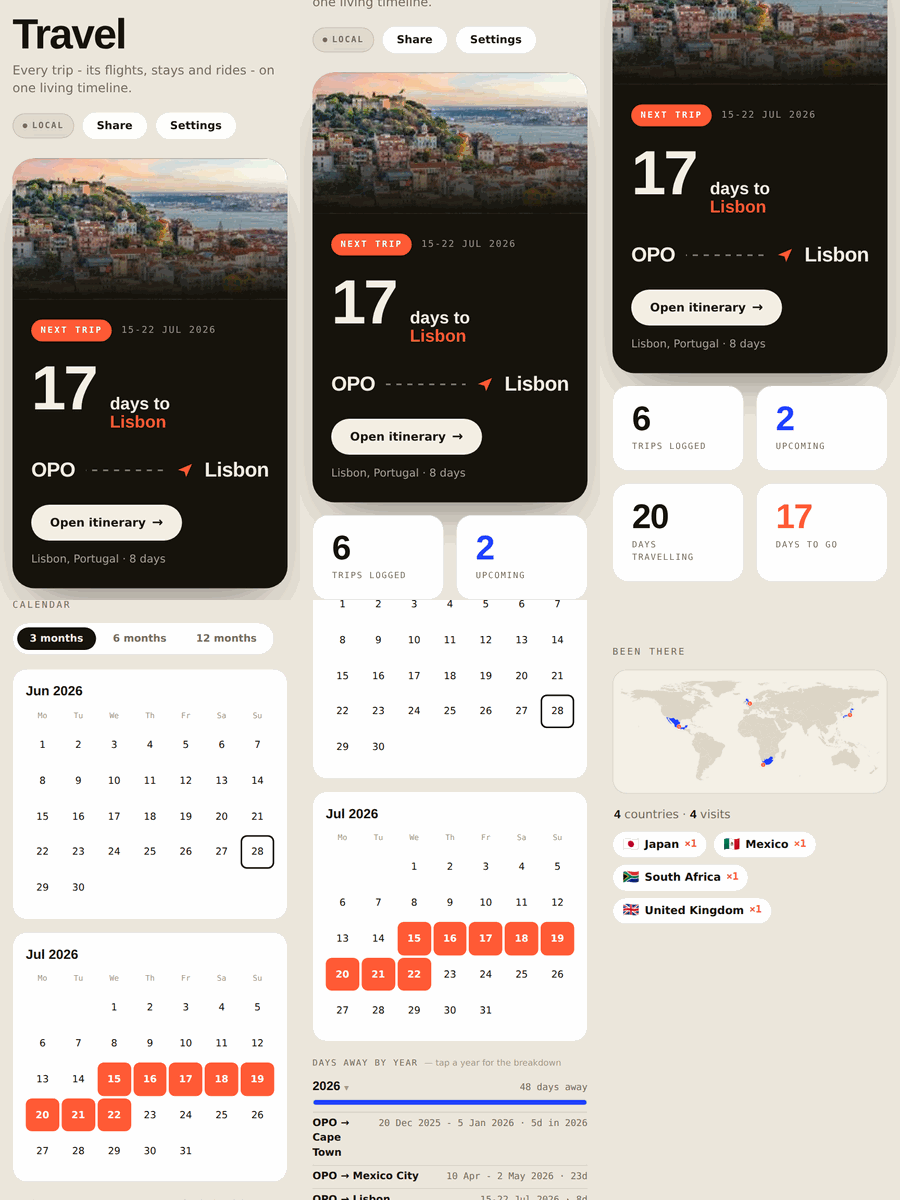
一款单屏旅行应用,由你自己免费托管在自己的 Cloudflare 账户上。它会把你的旅行信息汇总在一起,并(可选地)从你的 Google 日历和 Gmail 自动填充内容,然后补充额外的功能:年度日历、“去过哪里”世界地图、每次行程的天气、货币、插头类型、紧急电话号码,以及一键“添加到任意日历”。个人化且自托管。每个人运行各自自己的副本,使用各自自己的数据。没有人登录他人的实例;没有共享服务器。一切都存放在你的 Cloudflare 账户中,受你的密码保护。 一窥内部
| 行程一览 | 年度概览 + 出行天数 | “去过那里”地图 |
|---|---|---|
<sub>一个“Lisbon(里斯本)”行程示例。应用会自动获取每个目的地的照片。</sub> ✨ 主要功能
行程与计划 · 🧳 每个行程的计划 —— 将航班、酒店、网约车和自由格式的备注附加到任何行程;手动添加的计划永远不会被同步覆盖。 · ✍️ 手动添加或让它自动填充 —— 几秒钟内输入一个行程,或者连接 Google(见下文)让预订信息自动流入。 · 🛟 你亲手创建的计划是神圣不可侵犯的 —— 任何自动同步都不会更改或删除你手动添加的计划。
规划与概览 · 🗓️ 日历概览 —— 一个 3 / 6 / 12 个月的视图,精确显示你何时外出,每一天出行都已标注。 · 📊 按年份统计的出行天数 —— 查看每个日历年(1 月 1 日至 12 月 31 日)的总出行天数;点击某一年可查看每次行程的明细,因此任何数字都能一键查看“原因”。 · 🌍 “去过那里”世界地图 —— 你踏足的每个国家都会在世界地图上被填涂,每个国家都有一个访问次数(即使是小型岛屿国家也不例外)。 · 🛫 “即将到来 / 过往 / 愿望清单”标签页,附带一个用于监控票价的愿望清单,供你仍在憧憬的旅行使用。
一目了然的目的地信息(按行程自动填充) · 🌦️ 你出行日期的天气(天气预报,或在距离较远时的典型气候)。 · 💱 货币兑 € 和 $ 的实时汇率。 · 🔌 插头类型和电压,确保你带上正确的转接头。 · 🆘 当地紧急电话号码。 · 🖼️ 目的地的一张真实照片。
在手机上,且只属于你 · 🔗 分享行程 —— 一键复制一个私密只读链接,让同行旅伴可以查看实时行程(包括酒店门锁密码),无需登录。 · 🎉 年度回顾 —— 翻转分享卡片,呈现你的年度回顾:行程、出行天数、国家、距离 —— 准备好讲故事。 · 📅 添加到任意日历 —— 一键导出 .ics 文件以用于 Apple / Google / Outlook,外加一个私密的按 URL 订阅的行程源,可持续保持更新。 · 🩹 每周快照 —— 每个周日自动进行完整备份(保留 4 周,且在每次破坏性操作前额外保留一份),一键即可恢复。 · 📱 像原生应用一样安装 —— 在 iPhone 或 Android 上添加到主屏幕,全屏打开,可离线运行(它是一个 PWA)。(步骤详见下文。) · 🔐 你自己的密码 —— 设置一次,每台设备可保持登录 30 天。 · 🛍️ 备份与导入 —— 将你的所有行程导出为 JSON,随时重新导入。 · 🛡️ 100% 你的数据 —— 一切都存放在你的 Cloudflare 账户中;任何其他人(甚至仓库作者)都看不到你的行程。 部署你自己的副本(≈5 分钟,免费) · 点击按钮
这会将仓库复制到你的 GitHub,在你的 Cloudflare 账户中创建 Worker,并自动创建所需的 KV 命名空间。(免费套餐完全够用。)部署完成后,你将获得一个类似 https://travel-roamradar.<you>.workers.dev 的 URL。 部署时无需任何密钥。如果表单显示了任何变量界面,请保持所有设置不变并继续 —— Google 和 Claude 都将在之后于应用内部(设置中)连接,绝不在部署时连接。 “项目名称”下出现“出现未知错误”?几乎总是以下原因之一: 你的 GitHub 上存在一个同名的早期尝试遗留的仓库(请删除它或选择新的项目名称)、Cloudflare GitHub 应用未被授权访问所选的 GitHub 账户(github.com → 设置 → 应用程序 → Cloudflare Workers & Pages → 授予访问权限),或一个全新的 Cloudflare 账户尚未注册其 workers.dev 子域名(Cloudflare 控制面板 → Workers & Pages → 设置你的子域名,然后重试)。 · 打开应用并设置你的密码
打开你的新 URL。第一个登录的人将设置邮箱 + 密码 —— 因此请立即完成此操作。(可使用任何邮箱;它仅用于登录。) · 开始添加行程
这就是你需要做的全部 —— 添加一个带日期的行程,其他所有内容(天气、货币、地图、日历)都将围绕它自动填充。希望预订信息自动导入吗?在下面的“自动导入”部分连接 Google。 · 将其放到你手机的主屏幕上
请参阅下方“📱 添加到主屏幕”中的分手机操作步骤。
就这样。🎉 📱 添加到主屏幕
该应用是一个 PWA —— 一旦放到主屏幕上,它会以全屏方式打开,带有独立图标,没有浏览器栏,并且像普通应用一样工作(对于不需要网络的部分甚至可以离线工作)。 iPhone / iPad(Safari) · 在 Safari 中打开你的应用 URL(例如 https://travel-roamradar.<you>.workers.dev)—— 在 iOS 上必须是 Safari,而不是 Chrome。 · 点击分享按钮(带向上箭头的方块图标)。 · 向下滚动并点击“添加到主屏幕”。 · 如有需要可编辑名称 → 点击右上角的“添加”。 · 从新图标打开它。登录一次;它将保持登录 30 天。 Android(Chrome) · 在 Chrome 中打开你的应用 URL。 · 点击 ⋮ 菜单(右上角)。 · 点击“添加到主屏幕”(如果显示则为“安装应用”)。 · 确认添加 / 安装。 · 从新图标打开它并登录。 提示:在你使用的每台设备上都进行添加 —— 每台设备都会独立保持登录状态,它们都会通过你的 Worker 进行同步。
<details> <summary>更喜欢命令行?(可选)</summary>
</details> 自动导入(可选)
该应用完全可以通过手动方式使用。若希望行程自动填充,可在应用内部(设置中)连接以下服务 —— 无需使用 Cloudflare 控制面板: · Google 日历和 Gmail —— 在 console.cloud.google.com 进行一次性设置(创建一个项目,启用 Calendar + Gmail API,制作一个 OAuth 客户端;应用会显示你的确切 origin/redirect 值供你粘贴)。然后进入设置 → 连接 Google。行程将被写入你的日历,而你日历上的预订信息会附加到行程上。· 邮件 → 行程解析(通过 Claude)—— 在设置中粘贴你自己的 Anthropic API 密钥。你收件箱中的预订确认邮件(Booking.com、Airbnb、航空公司、Uber……)将被自动解析为计划 —— 包含门锁密码的酒店、带有航班号和时间的航班、接送信息。每小时后台检查会处理新邮件,即使应用处于关闭状态;每日同步执行完整任务。· 转发任何内容:将任何预订确认邮件发送至你在 @ 之前加上 +trip 的自己的邮箱(例如 you+trip@yourdomain.com),它将在一小时内被归档 —— 无论发件人是谁。还没有匹配的行程?转发的酒店住宿或回程机票会自动创建行程。归档具有地理感知能力(Funchal 的酒店会归入你的“Madeira”行程),即使是没有日期的酒店消息(例如门锁密码)也会按目的地归档到正确的行程。应用内的帮助将显示你的个人转发地址。· Calendly 支持作为 Worker 密钥(参见 docs/dev.vars.example)。
更倾向于使用控制面板密钥而非应用内密钥?每个凭据也可以通过 wrangler secret put 进行设置 —— 控制面板密钥始终优先于应用内密钥。 工作原理 · travel-app.html / public/index.html —— 前端(一个文件,使用原生 JavaScript)。 · worker.js —— Cloudflare Worker:提供应用服务,由你的密码进行保护,运行可选的 Google 日历 + Gmail 导入,并将所有内容存储在一个 KV 命名空间(TRIPS)中。 · wrangler.toml —— Worker 配置:KV 绑定,每天一次完整同步(UTC 18:00)和每小时一次的仅邮件检查 —— 应用中的同步按钮可按需运行完整任务。
隐私
一切都存放在你的 Cloudflare 账户中:你的行程在你的 KV 中,你的密钥在你的 Worker 上,受你的密码保护。本仓库的维护者无法访问你的实例或你的数据。 匿名安装计数
唯一的例外,且范围非常有限:在首次设置时(你创建密码的那一刻),你的实例可以发送一次匿名 ping —— 实际上就是 { "id": "<一个随机的 128 位数字>" },没有其他任何内容 —— 到维护者运行的一个小型计数器 Worker,仅用于让他们大致了解有多少人正在使用此模板。
这就是全部。任何行程、邮件、密钥、姓名、位置 —— 除了那一个随机数字之外,没有其他任何类型的数据 —— 在任何时候、以任何理由被发送、追踪、记录或提供给任何人。 该 id 无法被追溯到你;它存在的唯一目的是确保你的实例不会被重复计数。 若要查看运行总数,请在浏览器中打开 https://<your-counter>.workers.dev/count?key=<your READ_KEY> —— 它只是一个只显示数字的简单页面,无需解析。 两端的代码都是公开的:ping 操作是 worker.js 中的 pingInstallCount(),接收 ping 的计数器是 counter/counter-worker.js 的全部内容 —— 五行代码,仅存储一个 id 和一个总计,仅此而已。
默认情况下它是关闭的 —— TELEMETRY_URL 在 wrangler.toml 中默认留空,这意味着零网络调用,彻底关闭,除非你自己部署计数器并粘贴其 URL。从一个公开克隆的此仓库部署(其中有人(例如维护者)已填写该行)意味着你的实例也会参与;将该行留空,或删除 worker.js 中的 ctx.waitUntil(pingInstallCount(env)) 调用,即可彻底退出 —— 无论如何,应用中的其他功能都不依赖于它。
常见问题解答
RoamRadar 是免费的吗? 是的。它是开源且自托管的 —— 你在自己的 Cloudflare 账户上运行自己的副本,个人使用是免费的。
我的旅行数据存放在哪里? 存放在你自己的 Cloudflare KV 中,受你自己的密码保护。不会发送到任何共享服务器,仓库作者也无法查看你的行程。
我必须连接我的电子邮件或日历吗? 不必要。RoamRadar 完全可以通过手动方式使用。连接 Google 日历和 Gmail 是可选的,仅用于根据你现有的预订自动填充行程。
RoamRadar 是用什么构建的? 一个 Cloudflare Worker 服务于一个原生 JavaScript 前端,使用一个 KV 命名空间进行存储。没有框架,没有构建步骤。
RoamRadar 是谁制作的? Giovanni Brees,一位创始人兼 AI 优先的创业者。他的 AI 开发智能体从零开始构建了该应用,由 Claude Fable 和 Codex 审查代码,Claude 处理视觉设计。 作者
由 Giovanni Brees 创建 —— 一位创始人兼 AI 优先的 创业者,致力于在 AI 智能体和自动化的前沿进行构建与写作。RoamRadar 是他使用 AI 智能体交付完整、实用软件的实验之一。 · 网站:https://www.giovannibrees.com · LinkedIn:https://www.linkedin.com/in/giovannibrees/ · 播客,The Zero-Employee Company:https://open.spotify.com/show/033TuF4FmEurDDvBZlOAYr 许可证
PolyForm Noncommercial 1.0.0 —— 可免费运行、修改并自托管用于任何非商业目的。不得出售或将其用于商业用途。
</content>
译文由上游机器翻译生成,可能有误;判断请以英文原文为准。
英文原文(来源本站未改写)
✈️ RoamRadar - your own personal travel hub A free, open-source, self-hosted personal travel app. Keep every flight, hotel, ride, countdown, wishlist and past trip on one living timeline. Bookings can flow in automatically from Google Calendar and Gmail. Runs as a single Cloudflare Worker on your own account. Built with AI agents by Giovanni Brees.
A single-screen travel app you host yourself, for free, on your own Cloudflare account. It pulls your trips together and (optionally) fills them in automatically from your Google Calendar and Gmail, then adds the extras: a year calendar, a "been there" world map, per-trip weather, currency, plug type, emergency numbers, and one-tap "add to any calendar." Personal and self-hosted. Each person runs their own copy with their own data. Nobody logs into anyone else's instance; there is no shared server. Everything lives in your Cloudflare account, behind your password. A look inside
| A trip at a glance | Year overview + days away | "Been there" map |
|---|---|---|
<sub>A sample “Lisbon” trip. The app pulls each destination's photo automatically.</sub> ✨ Key features
Trips & plans · 🧳 Per-trip plans — attach flights, hotels, rides and free-text notes to any trip; manual plans are never overwritten by a sync. · ✍️ Add by hand or let it fill itself in — type a trip in seconds, or connect Google (below) and let bookings flow in on their own. · 🛟 Your hand-made plans are sacred — no automatic sync ever changes or deletes a plan you added yourself.
Planning & overview · 🗓️ Calendar overview — a 3 / 6 / 12-month view of exactly when you're away, with every travel day marked. · 📊 Days away by year — see total days travelled per calendar year (Jan 1–Dec 31); tap a year for the per-trip breakdown so any number is one tap from "why." · 🌍 "Been there" world map — every country you've set foot in, filled in on a world map, each with a visit count (even tiny island nations). · 🛫 Upcoming / Past / Wishlist tabs, with a fare-watch wishlist for trips you're still dreaming up.
At-a-glance destination intel (auto-filled per trip) · 🌦️ Weather for your travel dates (forecast, or the typical climate if far off). · 💱 Currency vs both € and $, live rates. · 🔌 Plug type & voltage so you pack the right adapter. · 🆘 Local emergency number. · 🖼️ A real photo of where you're heading.
On your phone & yours alone · 🔗 Share a trip — one tap copies a private read-only link so a travel companion sees the live itinerary (hotel door codes included), no login. · 🎉 Year wrapped — flip the share card to your year in review: trips, days away, countries, distance — story-ready. · 📅 Add to any calendar — one-tap .ics export for Apple / Google / Outlook, plus a private subscribe-by-URL feed of all trips that stays updated. · 🩹 Weekly snapshots — an automatic full backup every Sunday (4 weeks kept, plus one before every destructive action), restored in one tap. · 📱 Installs like a native app — Add to Home Screen on iPhone or Android, opens full-screen, works offline (it's a PWA). (Step-by-step below.) · 🔐 Your own password — set once, stays signed in for 30 days per device. · 🗄️ Backup & import — export all your trips as JSON, re-import any time. · 🛡️ 100% your data — everything lives in your Cloudflare account;
nobody else (not even the repo author) can see your trips.Deploy your own (≈5 minutes, free) · Click the button
This copies the repo into your GitHub, creates the Worker in your Cloudflare account, and auto-creates the KV namespace it needs. (Free plan is plenty.) When it finishes you'll get a URL like https://travel-roamradar.<you>.workers.dev.No keys are needed to deploy.If the form shows any variables screen, leave everything as-is and continue — Google and Claude both connect inside the app afterwards (Settings), never at deploy time. "An unknown error occurred" under Project name?
Almost always one of: a leftover repo from an earlier attempt with the same name on your GitHub (delete it or pick a new project name), the Cloudflare GitHub app not having access to the selected Git account (github.com → Settings → Applications → Cloudflare Workers & Pages → grant access), or a brand-new Cloudflare account that hasn't registered its workers.dev subdomain yet (Cloudflare dash → Workers & Pages → set your subdomain, then retry). · Open the app and set your password
Open your new URL. The first person to log in sets the email + password — so do this immediately. (Use any email; it's just your login.) · Start adding trips
That's all you need — add a trip with dates and everything else (weather, currency, map, calendar) fills in around it. Want your bookings to import themselves? Connect Google in the Automatic import section below. · Put it on your phone's home screen
See "📱 Add it to your home screen" just below for the per-phone steps.
That's it. 🎉 📱 Add it to your home screen
The app is a PWA — once it's on your home screen it opens full-screen with its own icon, no browser bars, and works like a normal app (even offline for the parts that don't need the network). iPhone / iPad (Safari) · Open your app URL (e.g. https://travel-roamradar.<you>.workers.dev) in Safari — this must be Safari, not Chrome, on iOS. · Tap the Share button (the square with an arrow pointing up). · Scroll down and tap Add to Home Screen. · Edit the name if you like → tap Add (top right). · Open it from the new icon.Log in once;it stays signed in for 30 days.
Android (Chrome) · Open your app URL in Chrome. · Tap the ⋮ menu (top right). · Tap Add to Home screen (or Install app if it's offered). · Confirm Add / Install. · Open it from the new icon and log in.Tip: add it on every device you use — each one stays signed in on its own, and they all sync through your Worker.
<details> <summary>Prefer the command line? (optional)</summary>
</details> Automatic import (optional)
The app is fully usable by hand.To make trips fill themselves in, connect these from inside the app (Settings) — no Cloudflare dashboard needed: · Google Calendar & Gmail — one-time setup at console.cloud.google.com (create a project, enable the Calendar + Gmail APIs, make an OAuth client;the app shows YOUR exact origin/redirect values to paste).Then Settings → Connect Google.Trips get written to your calendar, and bookings on your calendar attach to trips. · Email → trip parsing (via Claude) — paste your own Anthropic API key in Settings.
Booking confirmations in your inbox (Booking.com, Airbnb, airlines, Uber…) are parsed into plans automatically — hotel with door PIN, flight with number and times, transfer pickup info.An hourly background check files new mail even with the app closed;the daily sync does the full run. · Forward anything: send any confirmation email to yourself with +trip before the @ (e.g. you+trip@yourdomain.com) and it's filed within the hour — whatever the sender.No matching trip yet?A forwarded hotel stay or return ticket creates the trip automatically.
Filing is geography-aware (a Funchal hotel lands in your "Madeira" trip), and even a date-less hotel message (a door code, say) files into the right trip by destination.The in-app Help shows your personal forward address. · Calendly is supported as a Worker secret (see docs/dev.vars.example).
Prefer dashboard secrets over in-app keys? Every credential can also be set via wrangler secret put — a dashboard secret always wins over the in-app copy. How it works · travel-app.html / public/index.html — the front end (one file, vanilla JS). · worker.js — the Cloudflare Worker: serves the app, gates it behind your password, runs the optional Google Calendar + Gmail import, and stores everything in one KV namespace (TRIPS). · wrangler.toml — Worker config: the KV binding, one full sync per day (18:00 UTC) and an hourly email-only check — the app's Sync button runs the full job on demand.
Privacy
Everything lives in your Cloudflare account: your trips in your KV, your keys on your Worker, behind your password. The maintainer of this repo has no access to your instance or your data. Anonymous install count
The one exception, and it's a narrow one: on first-time setup (the moment you create your password), your instance can send one anonymous ping — literally { "id": "<a random 128-bit number>" } and nothing else — to a tiny counter Worker the maintainer runs, just so they know roughly how many people are using this template.
That's the whole of it. No trip, no email, no key, no name, no location — no data of any kind beyond that one random number — is ever sent, tracked, logged, or available to anyone, at any time, for any reason. The id can't be traced back to you; it exists only so your instance isn't counted twice. To see the running total, open https://<your-counter>.workers.dev/count?key=<your READ_KEY> in a browser — it's a plain page with just the number, nothing to parse. The code for both sides is public: the ping is pingInstallCount() in worker.js, and the counter that receives it is the whole of counter/counter-worker.js — five lines that store an id and a total, nothing more.
It is off by default — TELEMETRY_URL ships blank in wrangler.toml,
which means zero network calls, full stop, unless you deploy the counter
yourself and paste its URL in. Deploying from a public clone of this repo
where someone (e.g. the maintainer) already filled that line in means your
instance participates too; blank the line, or delete the one ctx.waitUntil
(pingInstallCount(env)) call in worker.js, to opt out completely — nothing
else in the app depends on it either way.
Frequently asked questions
Is RoamRadar free? Yes. It is open-source and self-hosted - you run your own copy on your own Cloudflare account, which is free for personal use.
Where is my travel data stored? In your own Cloudflare KV, behind your own password. Nothing is sent to a shared server, and the repo author cannot see your trips.
Do I have to connect my email or calendar? No. RoamRadar is fully usable by hand. Connecting Google Calendar and Gmail is optional and only makes trips fill themselves in from your existing bookings.
What is RoamRadar built with? A single Cloudflare Worker serving a vanilla-JavaScript front end, with one KV namespace for storage. No framework, no build step.
Who made RoamRadar? Giovanni Brees, a founder and AI-first entrepreneur. His AI development agent built the app from scratch, with Claude Fable and Codex reviewing the code and Claude handling the visual design. Author
Created by Giovanni Brees - a founder and AI-first entrepreneur building and writing at the edge of AI agents and automation. RoamRadar is one of his experiments in shipping complete, useful software with AI agents. · Website: https://www.giovannibrees.com · LinkedIn: https://www.linkedin.com/in/giovannibrees/ · Podcast, The Zero-Employee Company: https://open.spotify.com/show/033TuF4FmEurDDvBZlOAYr License
PolyForm Noncommercial 1.0.0 — free to run, modify, and self-host for any noncommercial purpose. You may not sell it or use it commercially.
</content>
这条还缺什么证据?
下面每条都由本条已有字段推出(等级、理由、商业模式、来源次数、是否演示), 本站不生成推测性结论;通用验证方法放在方法论页。
- 可核验的收入或付费证据查官网定价页与付费口径;第三方数据源(如 GetLatka)只作旁证,需标注来源与时点。
- 商业模式未定确认按席位/按用量/授权还是开源托管版收费;开源项目另查 LICENSE 与是否存在付费版。
- 只有单一来源找一手站点或其他渠道是否重复出现同一产品;社区热帖数量不等于商业进展。
通用验证清单(谁有这个问题/谁愿意付费/一个人能交付哪一小步)见我们的筛选方法。