我们发现了什么
# ff-tracking 虚拟摄像机拍摄 AI 代理的屏幕,跟踪器锁定它输入的每一个字形。 六秒,两次 fframes (https://github.com/dmtrKovalenko/fframes) 处理,一个 SkSL shader。 | 文件 | 内容 | |---|---| | hud/src/bin/camera.rs | 写入 out/camera.json:每一帧的缩放、俯仰和翻滚、跟踪框在输出中的位置以及所拍摄屏幕中心的落点 | | score/scor
- 来源:GitHub(发现于 2026-10-10)
- 证据等级:D · 发现产品或需求信号,暂未获得可核验的商业证据。
- 商业模式:待核验
- 主题:独立产品
- 初筛评分:18.8/100 · 收录 1 次
证据,比故事更重要。
规则清洗与初筛,未经人工商业核验。原文语境、实际客户和付费情况仍需自行验证。
引用与数字披露
来源类型(原作者自述/第三方测算/媒体转引)需采集端标注,本版尚未落字段。
- 作者
- 未标注
- 抓取日期
- 来源类型
- 未标注
- 币种
- 未标注
- 口径
- 未标注
- 披露主体
- 未标注
- 披露日期
- 未标注
上下文核对:来源原文含限定词projectedprojection,中文摘要未逐字保留 —— 引用或跨期比较前请回原文核对,别把估算读成已实现。
中文辅助译文(全文)
ff-tracking
虚拟摄像机拍摄 AI 代理的屏幕,同时跟踪器锁定它所输入的每一个字形。
六秒钟,两次 fframes 通道,一个 SkSL 着色器。 没有现成画面,没有商用音频:每一个像素与每一个声音都来自代码。
   

图注:终端倾斜近景,阴影线跟踪框锁定字形,配以热成像与磷光绿调色板,末尾汇聚为绿色"Done"胶囊
▶ 带声音的完整 1080p · 在 X 上 · 工作原理 · 快速开始
fframes 研究 · #1 ff-tracking · #2 ff-unmute,那个可以开启声音的版本
你正在看到的内容
AI 代理在终端中"出声思考":thinking… → reading 14 files →
tool_call: render_frame() → … → ✓ 0 problems → Done。一个计算机视觉风格的跟踪器
追随最新出现的字符。一台始终不静止的摄像机贴近屏幕拍摄。
- 真实坐标。 每个 x: 1403 y: 559 标签都是该框在输出画面这一帧中的实际像素位置。
它们没有一个是随机数字。
- 焦点追随跟踪器。 焦平面由被跟踪的框决定,因此景深会随着代理的输入沿行移动。
- 思维链,可视化绘制。 链接按阅读顺序从一个框连到下一个框,每个链接上都有一个点移动。
- 锁定。 每个镜头的最后,新出现的词被锁定:两帧红色,扫描线撕裂,一声蜂鸣随框的位置平移。
- 十二个镜头,十二种观感。 每 0.5 秒一次切换,依次经过纸张白、热成像、黑白、磷光、琥珀、海军蓝与霓虹。
- 坍缩与落地。 十四个框合为一个框,并在淡出至黑前变成 Done 胶囊。
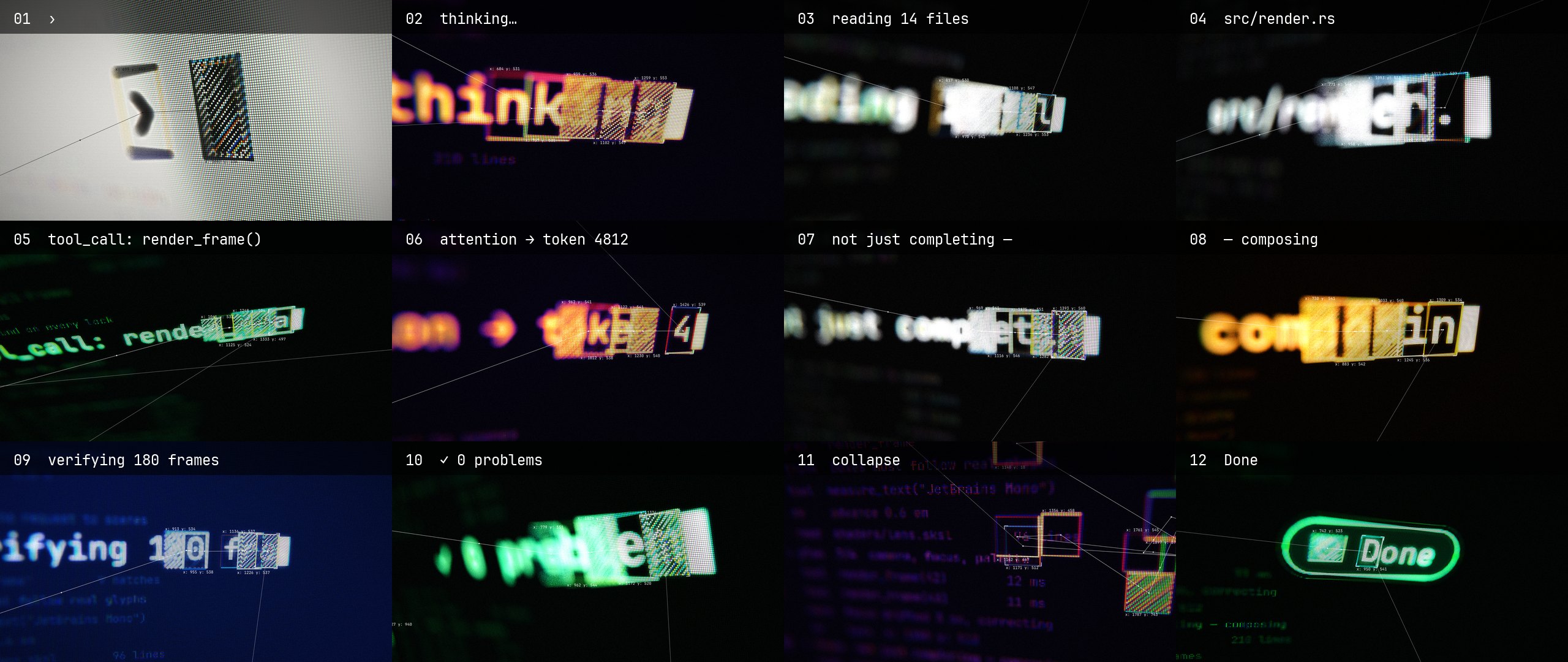
图注:十二个镜头的调色板联络印张:Paper White(纸张白)、Thermal(热成像)、Mono(黑白)、Phosphor(磷光)、Amber(琥珀)、Navy(海军蓝)、Neon(霓虹)
工作原理
hud ──► flat pass 1: SVG, 3840×2160 ─────────► out/pass/flat.mp4 ──┐ iChannel0
│ ▼
├────► lens pass 2: SkSL on Skia Metal + camera tracker ──► out/tracking.mp4
│ ▲ audio
└────► tracks ──► out/tracks.json ──► sfx.py ──► out/pass/sfx.wav ─────┘
Pass 1, flat,按照终端的方式绘制屏幕:黑底、白字、等宽字体,每个字形一个 ,
因此可以精确知道每个字符的位置。跟踪框就在屏幕本身之上。其中一些用 mix-blend-mode: difference
(差值混合)的 SVG 图案绘制阴影线,这样条纹在穿过字形时会变暗。唯一的颜色是纯红色,
它标记一个已锁定的框。该通道以 2× 渲染,因为镜头会将其放大最多 3×。
Pass 2, lens,将 pass 1 的每一帧作为着色器输入并对其进行拍摄。一个 SkSL
着色器完成所有物理效果:
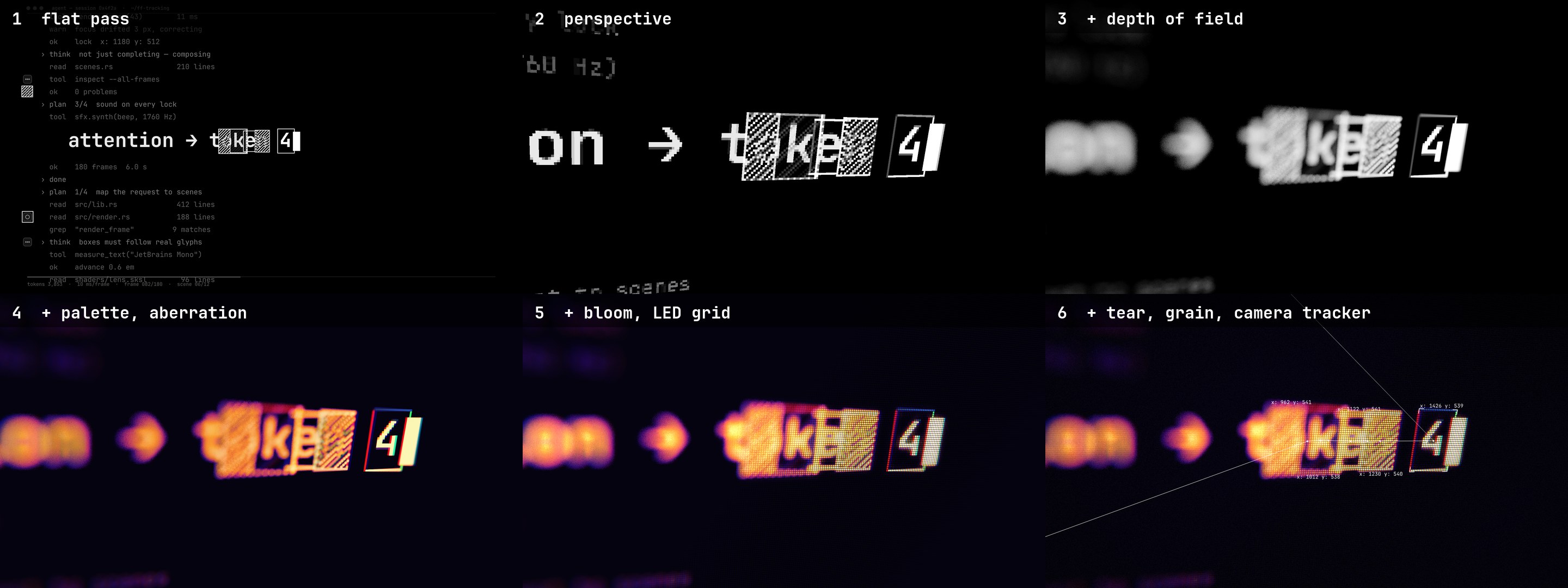
图注:同一帧依次经过镜头着色器的六步处理:1) Perspective(透视) 2) Depth of field(景深) 3) Palette and aberration(调色板与色差) 4) Bloom and LED grid(辉光与 LED 网格) 5) Tear, grain, camera tracker(撕裂、颗粒、摄像机跟踪器) 6) 最终成像
- Perspective. 每个像素向一个倾斜的平面投射射线:真正的透视,不是 SVG 倾斜变换。
- Depth of field. 弥散圆来自与被跟踪目标的深度差,采用 36 次黄金角度采样,高光按散景加权。
- Palette and aberration. 每个镜头的亮度按五个色阶映射。R、G、B 在径向偏移后的位置采样,偏移量在锁定时增大。
- Bloom and LED grid. 一圈大范围采样提升明亮字形周围的亮度。网格使用等面积的 RGB 条纹,因此不会增加色调,并会在失焦处淡出。
- Tear, grain, camera tracker. 在锁定时和切换之后,行发生滑动。在其之上,镜头清晰绘制自己的跟踪器:链接、标签和目标方括号,通过着色器摄像机在 CPU 端的副本
hud::project进行投影。
两个通道和声音读取同一个 hud crate,因此镜头始终知道它所聚焦的字形实际在什么位置。
声音:tools/sfx.py 读取 out/tracks.json 并合成所有声音。它生成屏幕嗡鸣、
每次切换的位粉碎毛刺、每次按键的点击声和每次锁定的五声调蜂鸣,蜂鸣声随框平移。
它在坍缩中加入一段上滑音效,并在 Done 时加入带低音冲击的钟声。
响度使用 ffmpeg 的 ebur128 测量并设定为 -14 LUFS。
配乐(可选):score/score.py 是第二条音轨,在 Slab 中制作:
风格更暗、更厚重的作品,120 BPM,使每次切换都落在节拍上。它读取同一个 out/tracks.json
以及来自 camera 二进制的 out/camera.json,因此混音跟随镜头。被跟踪的框平移锁定提示音和按键声,
屏幕的滑动平移垫音、上滑音效和毛刺声,每次推近变焦都打开低通滤波器,红色锁定帧会撕裂低音。见 Slab 配乐。
快速开始
环境要求:搭载 Apple silicon 的 macOS(Skia on Metal)、Rust、ffmpeg、带 numpy 和 scipy 的 Python 3。
README 图片还需要 Pillow 和 img2webp。
git clone https://github.com/mrsarac/ff-tracking && cd ff-tracking
tools/render.sh # → out/tracking.mp4
render.sh 构建工作区,导出 tracks,渲染 pass 1,合成声音并渲染 pass 2。
在 M3 Pro 上除首次构建外约需 40 秒。
每个通道都是 fframes 的 CLI,因此常用工具在每个通道上都可以工作:
target/release/lens strip all -n 12 # contact sheet of the final video
target/release/lens frame 81 -o frames # one full-size frame
target/release/lens preview # real-time window with sound
target/release/lens audio analyze # loudness, true peak
LENS_STAGE=1 target/release/lens frame 81 # stop the shader after a step (0-3), as in the image above
python3 -I tools/readme_media.py # rebuild the images in this README
Slab 配乐
tools/score.sh 是将 render.sh 中的 sfx.py 替换为 Slab 配乐的版本:
tools/score.sh # uses the committed render, score/score.wav
SLAB=/path/to/slab tools/score.sh # renders the score again from score/score.py
渲染需要一个通过 zig build -Doptimize=ReleaseFast 构建的 Slab 检出仓库。
score/score.py 写出项目 score/ff_tracking.slab,该项目在 Slab 的编曲与混音器中打开,并以无头方式渲染。
渲染会延伸到画面之外以保留混响尾音,因此 score.sh 在 6 秒处裁断并与淡出至黑一同淡出。
最终响度约 -10.7 LUFS,真峰值 -1 dBTP。
| 文件 | 说明 |
|---|---|
hud/src/bin/camera.rs | 写出 out/camera.json:每帧的变焦、倾斜与滚动,被跟踪框在输出中的位置以及所拍摄画面中心落在的位置 |
score/score.py | 配乐:读取两个 JSON 文件,写出 Slab 项目并渲染它 |
score/ff_tracking.slab/ | 生成的 Slab 项目(轨道、音符、自动化、效果) |
score/score.wav | 已渲染并裁剪为 6 秒、48 kHz 的配乐,使视频无需 Slab 即可构建 |
tools/score.sh | 包含配乐的完整流水线 |
修改一个镜头并运行 SLAB=… tools/score.sh:撞击、平移和滤波器动作都会跟随新的时机与摄像机。
Slab 配乐由 Slab 的作者 nooga (@MGasperowicz) 创作,在 #1 中贡献;制作过程见 #2。
许可证说明: score/score.py 引入了随 Slab 以 GPL-3.0 分发的 slabkit。slabkit 不属于本仓库,
仅在重新渲染配乐时才需要 Slab。其作者将 score/score.py、score/ff_tracking.slab/ 中的项目以及 score/score.wav
以本仓库的 MIT 许可证提供。
改成你自己的版本
每个镜头都是 hud/src/lib.rs 中 SCENE_LIST 里的一项:
SceneDef {
kind: Kind::Typing,
text: "thinking…", // what the agent types
palette: Palette::Thermal, // Paper, Thermal, Mono, Phosphor, Amber, Navy, Neon
// tilt_x tilt_y roll zoom 0→1 pan x, y blur
cam: cam(0.38, -0.22, 0.04, 2.5, 2.8, 50.0, 0.0, 1.2),
hero: (560.0, 540.0), // where the line starts on the flat screen
size: 104.0, // font size
},
更改文本、调色板或摄像机,运行 tools/render.sh,跟踪器、焦点、标签和蜂鸣音都会随之变化。
cargo test -p hud 会检查每一行是否适配屏幕,以及摄像机是否将每个目标保持在画面内。
目录布局
hud/ shots, tracker boxes, camera per frame, projection (no fframes dependency)
flat/ pass 1: the screen, 3840×2160
lens/ pass 2: lens/shaders/lens.sksl and the camera-space tracker
tools/ render.sh (whole pipeline), sfx.py (sound), readme_media.py (these images),
score.sh (the pipeline with the Slab score)
score/ the Slab score: score.py, the ff_tracking.slab project, score.wav
docs/ design spec, prompts and decisions, fframes contributions
构建过程中的笔记
- 对着色器而言,一个同步的视频帧只是一张普通图像:
.image("iChannel0", &frame.get_synced_video_frame(..)?.into_image())。这正是双通道摄像机能够实现的原因。
- flat 是 SkSL 中的保留字(GLSL ES 的插值限定符),因此辅助函数应使用其他名称。
- 在 Video 层级,永远不要返回 Svgr::empty();应返回一个根 。空根是错误的,
在 Skia 渲染的后期,它只有在编码器耗尽后才会显现出来
(fframes#209)。
- 之所以采用两个通道,是因为着色器目前还不能对同一帧的 SVG 子树进行采样。
fframes#210 提出了这一方案。
致谢
- 视觉风格受 Michael Nowak (@mnowakdesign) 的启发。
未使用其任何素材。
- Slab 配乐(可选音轨):nooga 在 Slab 中制作。
- 基于 fframes 由 Dmitriy Kovalenko 构建,使用
Skia 渲染,FFmpeg 编码。
- 字体:JetBrains Mono(SIL OFL 1.1,见
licenses/JetBrainsMono-OFL.txt)。
- 使用 Claude Code 制作。docs/PROMPT.md 是制作本视频所使用的提示,
设计稿位于 docs/superpowers/specs/。
许可证
MIT © 2026 Mustafa Saraç。字体保留其自身许可证。
译文由上游机器翻译生成,可能有误;判断请以英文原文为准。
英文原文(来源本站未改写)
ff-tracking
A virtual camera films an AI agent's screen while a tracker locks onto every glyph it types.
Six seconds, two fframes passes, one SkSL shader. No footage, no stock audio: every pixel and every sound comes from code.
   
▶ Full 1080p with sound · On X · How it works · Quick start
fframes studies · #1 ff-tracking · #2 ff-unmute , the one you can unmute
What you are looking at
An agent thinks out loud in a terminal: thinking… → reading 14 files →
tool_call: render_frame() → … → ✓ 0 problems → Done. A computer-vision style tracker
follows the newest characters. A camera that never sits still films the screen up close.
- Real coordinates. Every x: 1403 y: 559 label is the box's actual pixel position in
that frame of the output.
None of them are random numbers.
- Focus that follows the tracker. The focal plane is set by the box being tracked, so
the depth of field racks along the line as the agent types.
- Chain of thought, drawn. Links run from box to box in reading order, and a dot runs
along every link.
- The lock. Every shot ends with the newest word locking on: red for two frames, a
scanline tear, a beep panned to where the box is.
- Twelve shots, twelve looks. A cut every 0.5 s through paper white, thermal, black
and white, phosphor, amber, navy and neon.
- A collapse and a landing. Fourteen boxes fall into one, and that box becomes a
Done pill before the fade to black.
How it works
hud ──► flat pass 1: SVG, 3840×2160 ─────────► out/pass/flat.mp4 ──┐ iChannel0
│ ▼
├────► lens pass 2: SkSL on Skia Metal + camera tracker ──► out/tracking.mp4
│ ▲ audio
└────► tracks ──► out/tracks.json ──► sfx.py ──► out/pass/sfx.wav ─────┘
Pass 1, flat, draws the screen the way a terminal would: black, white, monospace, one
per glyph, so the position of every character is known exactly. The tracker boxes
are on the screen itself. Some are hatched with an SVG pattern in mix-blend-mode:
difference, so the stripes turn dark where they cross a glyph. The only color is pure red,
and it marks a locked box. The pass renders at 2× because the lens magnifies it up to 3×.
Pass 2, lens, binds each frame of pass 1 as a shader input and films it. One SkSL
shader does everything physical:
1. Perspective. Every pixel shoots a ray at a tilted plane: real perspective, not an SVG skew. 2. Depth of field. The circle of confusion comes from the depth difference to the tracked target, with 36 golden-angle taps and highlights weighted like bokeh. 3. Palette and aberration. Brightness maps through five color stops per shot.R, G and B sample at radially shifted points, and the shift grows on a lock. 4. Bloom and LED grid. A wide ring of taps lifts everything around bright glyphs.The grid uses equal-area RGB stripes, so it adds no tint, and it fades out of focus. 5. Tear, grain, camera tracker. Rows slide on a lock and right after a cut.
On top, the
lens draws its own tracker sharp: links, labels and target brackets, projected with
hud::project, the CPU copy of the shader's camera.
Both passes and the sound read the same hud crate, so the lens always knows where the
glyph it focuses on actually is.
Sound: tools/sfx.py reads out/tracks.json and synthesizes everything. It makes a
screen hum, a bit-crushed glitch on each cut, a click per keystroke and a pentatonic beep
per lock, panned to the box. It adds a riser into the collapse and a chime with a sub hit on
Done. Loudness is measured with ffmpeg's ebur128 and set to -14 LUFS.
Score (optional): score/score.py is a second soundtrack, made in
Slab: a darker, heavier piece at 120 BPM, so every cut lands
on a beat. It reads the same out/tracks.json, plus out/camera.json from the camera
binary, so the mix follows the lens. The tracked box pans the lock blips and keystrokes, the
screen's slide pans the pad, riser and glitches, each zoom push opens the bass filter, and the
red lock frames tear the bass. See Slab score.
Quick start
Requirements: macOS with Apple silicon (Skia on Metal), Rust, ffmpeg, Python 3 with numpy
and scipy. The README images also need Pillow and img2webp.
git clone https://github.com/mrsarac/ff-tracking && cd ff-tracking
tools/render.sh # → out/tracking.mp4
render.sh builds the workspace, exports the tracks, renders pass 1, synthesizes the sound
and renders pass 2. It takes about 40 s on an M3 Pro, plus the first build.
Every pass is an fframes CLI, so the usual tools work on each of them:
target/release/lens strip all -n 12 # contact sheet of the final video
target/release/lens frame 81 -o frames # one full-size frame
target/release/lens preview # real-time window with sound
target/release/lens audio analyze # loudness, true peak
LENS_STAGE=1 target/release/lens frame 81 # stop the shader after a step (0-3), as in the image above
python3 -I tools/readme_media.py # rebuild the images in this README
Slab score
tools/score.sh is render.sh with the Slab score in place of sfx.py:
tools/score.sh # uses the committed render, score/score.wav
SLAB=/path/to/slab tools/score.sh # renders the score again from score/score.py
Rendering needs a Slab checkout built with
zig build -Doptimize=ReleaseFast. score/score.py writes the project
score/ff_tracking.slab, which opens in Slab's arrangement and mixer, and renders it headless.
The render runs past the picture for the reverb tail, so score.sh cuts it at 6 s and fades
it with the fade to black. It comes out around -10.7 LUFS with a -1 dBTP true peak.
| File | What it is |
|---|---|
hud/src/bin/camera.rs | writes out/camera.json: per frame, the zoom, tilt and roll, the tracked box's position in the output and where the filmed screen's centre lands |
score/score.py | the score: reads both JSON files, writes the Slab project, renders it |
score/ff_tracking.slab/ | the generated Slab project (tracks, notes, automation, effects) |
score/score.wav | the score rendered and cut to 6 s, 48 kHz, so the video builds without Slab |
tools/score.sh | the whole pipeline with the score |
Change a shot and run SLAB=… tools/score.sh: the hits, pans and filter moves follow the
new timing and camera.
The Slab score is by nooga (@MGasperowicz), the author of Slab, contributed in #1; how it was made is in #2.
License note: score/score.py imports slabkit, which ships with Slab under GPL-3.0. slabkit is not
part of this repo and Slab is needed only to re-render the score. Its author offers score/score.py,
the project in score/ff_tracking.slab/ and score/score.wav under this repo's MIT license.
Make it yours
Every shot is one entry in SCENE_LIST in hud/src/lib.rs:
SceneDef {
kind: Kind::Typing,
text: "thinking…", // what the agent types
palette: Palette::Thermal, // Paper, Thermal, Mono, Phosphor, Amber, Navy, Neon
// tilt_x tilt_y roll zoom 0→1 pan x, y blur
cam: cam(0.38, -0.22, 0.04, 2.5, 2.8, 50.0, 0.0, 1.2),
hero: (560.0, 540.0), // where the line starts on the flat screen
size: 104.0, // font size
},
Change the text, a palette or the camera, run tools/render.sh, and the tracker, focus,
labels and beeps all follow. cargo test -p hud checks that every line fits the screen and
that the camera keeps every target in frame.
Layout
hud/ shots, tracker boxes, camera per frame, projection (no fframes dependency)
flat/ pass 1: the screen, 3840×2160
lens/ pass 2: lens/shaders/lens.sksl and the camera-space tracker
tools/ render.sh (whole pipeline), sfx.py (sound), readme_media.py (these images),
score.sh (the pipeline with the Slab score)
score/ the Slab score: score.py, the ff_tracking.slab project, score.wav
docs/ design spec, prompts and decisions, fframes contributions
Notes from the build
- A synced video frame is a regular image for a shader:
.image("iChannel0", &frame.get_synced_video_frame(..)?.into_image()). That is what makes
the two-pass camera possible.
- flat is a reserved word in SkSL (a GLSL ES interpolation qualifier), so name helpers
something else.
- At the Video level, never return Svgr::empty(); return a root . An empty root is
an error, and late in a Skia render it surfaces only after the encoders drain
(fframes#209).
- The two passes exist because a shader can't yet sample an SVG subtree of the same frame.
fframes#210 proposes that.
Credits
- Visual style inspired by Michael Nowak (@mnowakdesign).
None of his footage is used.
- Slab score (optional soundtrack): nooga, made in Slab.
- Built on fframes by Dmitriy Kovalenko, rendering with
Skia, encoding with FFmpeg.
- Font: JetBrains Mono (SIL OFL 1.1, see
licenses/JetBrainsMono-OFL.txt).
- Made with Claude Code. docs/PROMPT.md is the prompt that makes this video,
and the design is in docs/superpowers/specs/.
License
MIT © 2026 Mustafa Saraç. The font keeps its own license.
这条还缺什么证据?
下面每条都由本条已有字段推出(等级、理由、商业模式、来源次数、是否演示), 本站不生成推测性结论;通用验证方法放在方法论页。
- 可核验的收入或付费证据查官网定价页与付费口径;第三方数据源(如 GetLatka)只作旁证,需标注来源与时点。
- 商业模式未定确认按席位/按用量/授权还是开源托管版收费;开源项目另查 LICENSE 与是否存在付费版。
- 只有单一来源找一手站点或其他渠道是否重复出现同一产品;社区热帖数量不等于商业进展。
通用验证清单(谁有这个问题/谁愿意付费/一个人能交付哪一小步)见我们的筛选方法。