我们发现了什么
Az1zzr/n8n-automation-security。# Wazuh → n8n → AI → Slack:自动化 SOC 告警分诊实验室 一个家庭实验室项目,将 Wazuh 安全告警自动发送至 n8n 工作流,由充当 SOC 分析师的 LLM 进行分析,并以简洁、结构化的消息形式投递至 Slack。
- 来源:GitHub(发现于 2026-10-07)
- 证据等级:D · 发现产品或需求信号,暂未获得可核验的商业证据。
- 商业模式:待核验
- 主题:AI Agent
- 初筛评分:16.3/100 · 收录 1 次
证据,比故事更重要。
规则清洗与初筛,未经人工商业核验。原文语境、实际客户和付费情况仍需自行验证。
引用与数字披露
来源类型(原作者自述/第三方测算/媒体转引)需采集端标注,本版尚未落字段。
- 作者
- 未标注
- 抓取日期
- 来源类型
- 未标注
- 币种
- 未标注
- 口径
- 未标注
- 披露主体
- 未标注
- 披露日期
- 未标注
中文辅助译文(全文)
Wazuh → n8n → AI → Slack:自动化 SOC 告警分诊实验
一个家庭实验项目,其中 Wazuh 安全告警会被自动发送到 n8n 工作流,由作为 SOC 分析师的 LLM 进行分析,并以一条干净、结构化的消息投递到 Slack。
作者:Aziz Zarrouk,计算机科学工程专业学生(ESPRIT),对网络安全和自动化感兴趣。 GitHub:Az1zzr
1. 目标
当分析师收到一条原始的 Wazuh 告警(一大块 JSON 数据)时,他们仍然需要阅读它、理解它、把它映射到 MITRE ATT&CK,并决定如何处理。我希望把这第一步自动化:
- Wazuh 在端点上检测到可疑行为。
- 告警通过 webhook 被转发到 n8n。
- 只有超过严重性阈值的告警才会进入 AI。
- AI 写出一段简短的、基于证据的 SOC 摘要。
- 摘要被发布到一个 Slack 频道。
2. 架构
flowchart LR
A[Windows 10 虚拟机
Wazuh agent
Testscript.ps1] -->|events| B[Wazuh Server 4.14.7
规则 + 告警]
B -->|custom-n8n 集成
HTTP POST JSON| C[n8n Webhook
自托管于 VPS]
C --> D[提取告警上下文
Set 节点]
D --> E{如果
rule level >= 10}
E -- yes --> F[AI Agent
OpenRouter chat 模型
SOC 分析师 prompt]
E -- no --> X[忽略]
F --> G[Slack
#n8n-automation-security]| 组件 | 角色 |
|---|---|
| VMware Workstation | 承载实验虚拟机 |
| Windows 10 虚拟机 | 被监控的端点,运行测试脚本 |
| Wazuh server 4.14.7 虚拟机 | SIEM / 检测,运行自定义集成 |
| Kali 虚拟机 | 用作管理 Wazuh server 的终端 |
| n8n(自托管于 Hostinger VPS) | 工作流自动化 |
OpenRouter(deepseek/deepseek-v4-flash) | LLM 提供方 |
| Slack | 告警投递 |
3. 仓库结构
.
├── README.md
├── integration/
│ ├── custom-n8n # Wazuh 集成脚本(Python)
│ └── ossec-integration-block.xml # 添加到 ossec.conf 中的块
├── testing/
│ ├── Testscript.ps1 # 编码后的 PowerShell 测试(在 Windows 虚拟机上运行)
│ └── mock-alert.sh # 用于单独测试 webhook 的伪造告警
└── screenshots/ # 下面使用的 7 张编号截图
4. 逐步搭建
步骤 1:创建 n8n webhook
在 n8n 中,我添加了一个 Webhook 节点:
- HTTP 方法:
POST - 路径:
wazuh-alert - 响应:
Immediately
n8n 提供两个 URL:一个 Test URL(/webhook-test/...)和一个 Production URL(/webhook/...)。Wazuh 集成使用 Production URL。
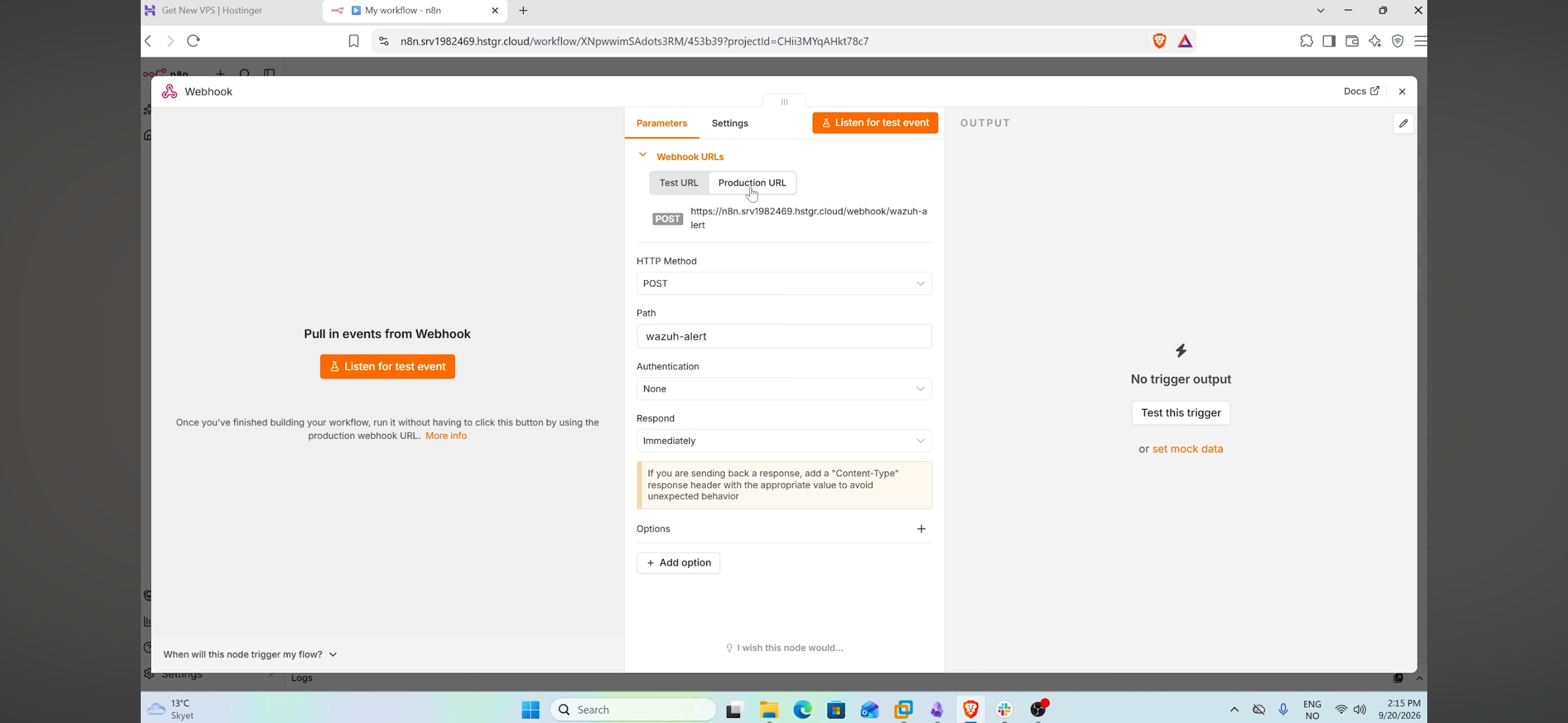 截图 1:Webhook 节点配置为 POST,路径为
 wazuh-alert,并选择了 Production URL。
步骤 2:使用伪造告警测试 webhook
在接触 Wazuh 之前,我从 Windows 虚拟机使用 curl 发送了一条 mock 告警来检查 n8n 端(参见 testing/mock-alert.sh)。
第一次调用返回 404("webhook not registered"),因为在测试模式下 webhook 只在点击 Execute workflow / Listen for test event 之后才监听一次。点击之后,第二次调用返回 {"message":"Workflow was started"}。
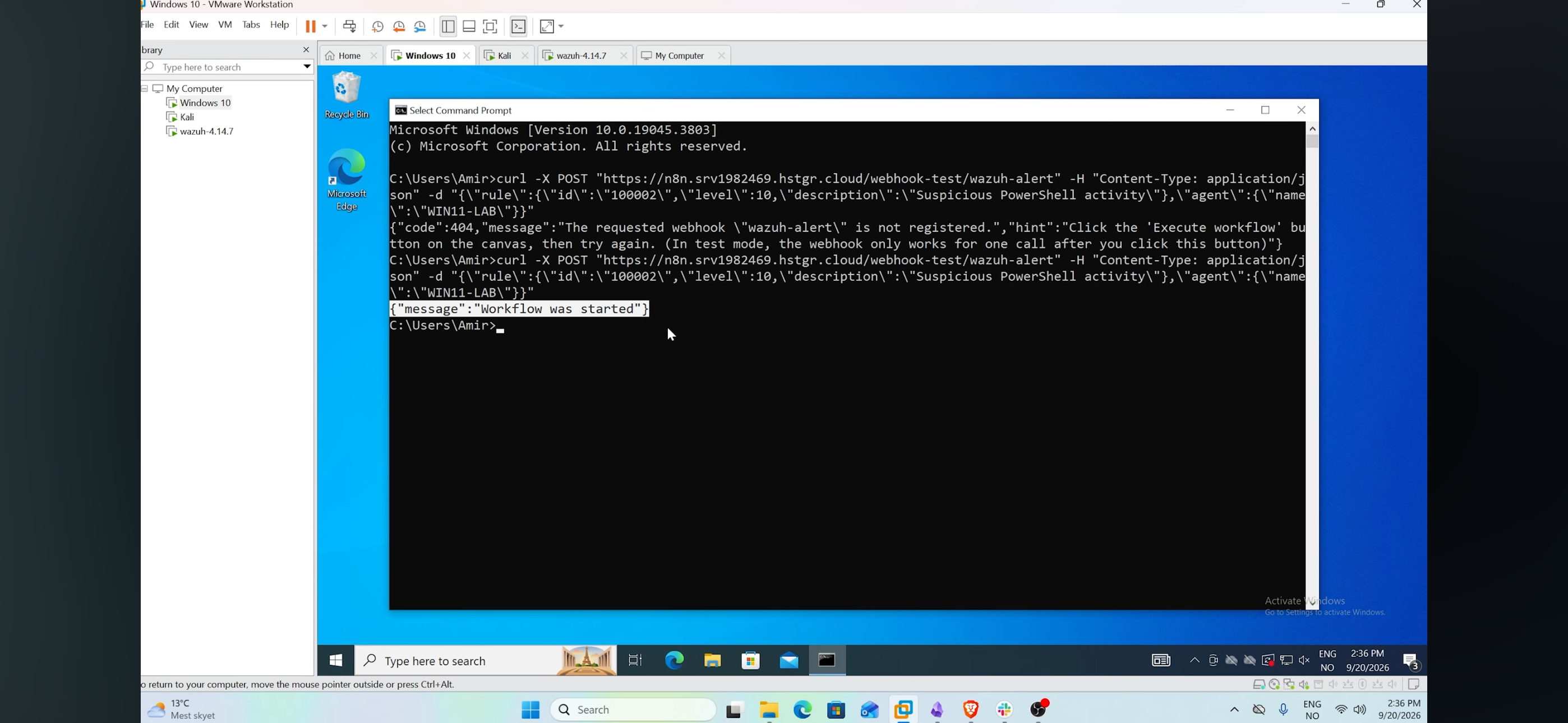 截图 2:第一次调用返回 404(未在监听),第二次调用返回 "Workflow was started"。
步骤 3:提取有用的字段(Set 节点 "Extract Alert Context")
原始的 Wazuh 告警体积很大,因此一个 Set 节点只保留 AI 需要的字段:rule id、rule level、description、event id、provider、user、process、command line、parent process、target file、process ids、MITRE technique 和 raw message。表达式形如 {{ $json.body.rule.description }}。
在给定告警中不存在的字段会以 undefined 的形式输出。这是正常的,因为不同的事件类型包含不同的字段,而 prompt 的写法已考虑到这一点。
步骤 4:按严重性过滤(If 节点)
一个 If 节点只保留 rule.level >= 10 的告警。低级别的噪音永远不会到达 AI,从而节省 API 成本并避免 Slack 被刷屏。
步骤 5:AI 分析(AI Agent + OpenRouter)
一个 AI Agent 节点使用一个 OpenRouter Chat Model(deepseek/deepseek-v4-flash)和一段 SOC 分析师 prompt。prompt 中重要的设计抉择:
- 仅使用告警字段中存在的事实。
- 不要编造 MITRE 技术、事件 ID、进程、用户或命令。
- 将 null / undefined / 空字段视为缺失信息,永远不要推断它们。
- 明确区分观察到的证据与分析。
- 输出固定的、对 Slack 友好的(mrkdwn)结构:Host、User、Process、Severity、What happened、Observed command、Decoded content、Why it matters、MITRE ATT&CK、Recommended action。
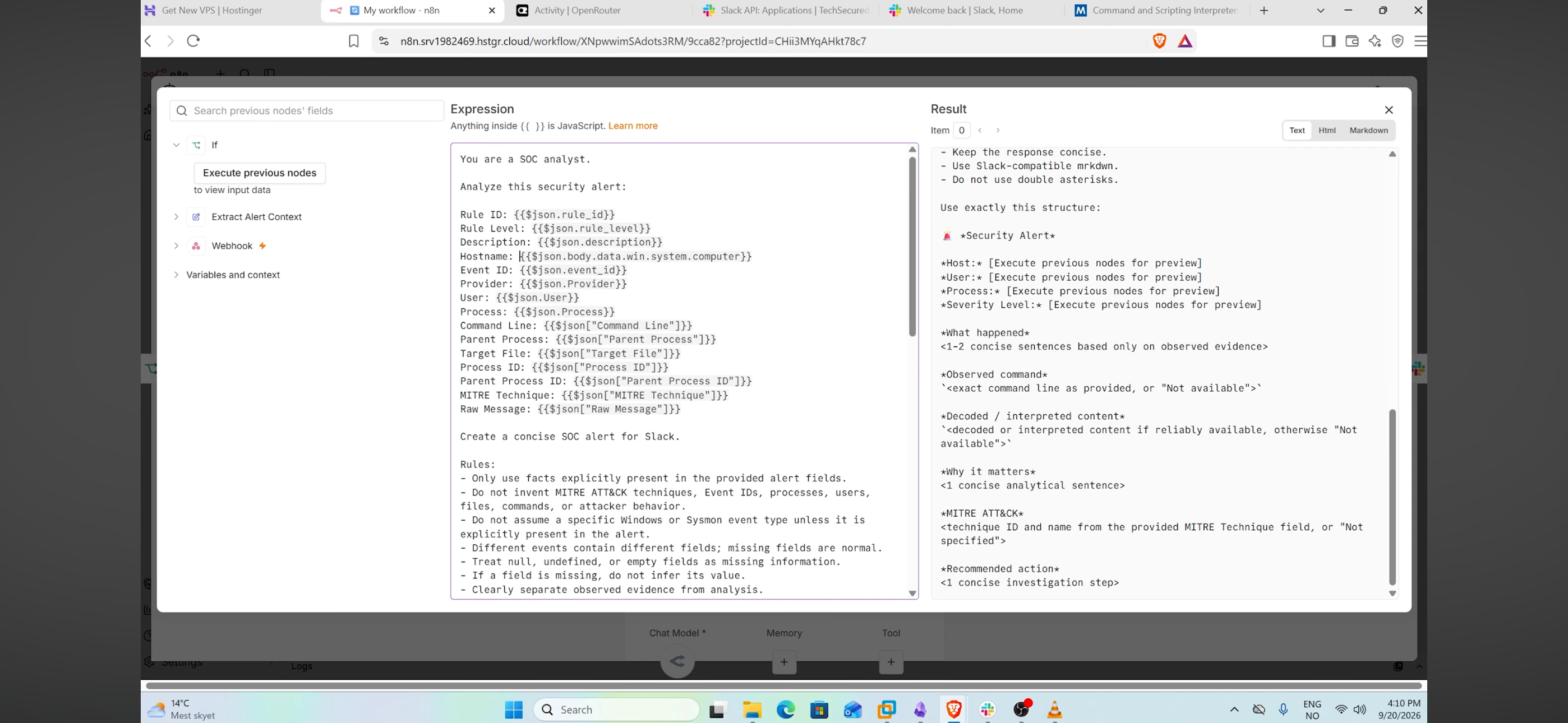 截图 3:n8n 中的 prompt 表达式(左)和输出模板预览(右)。
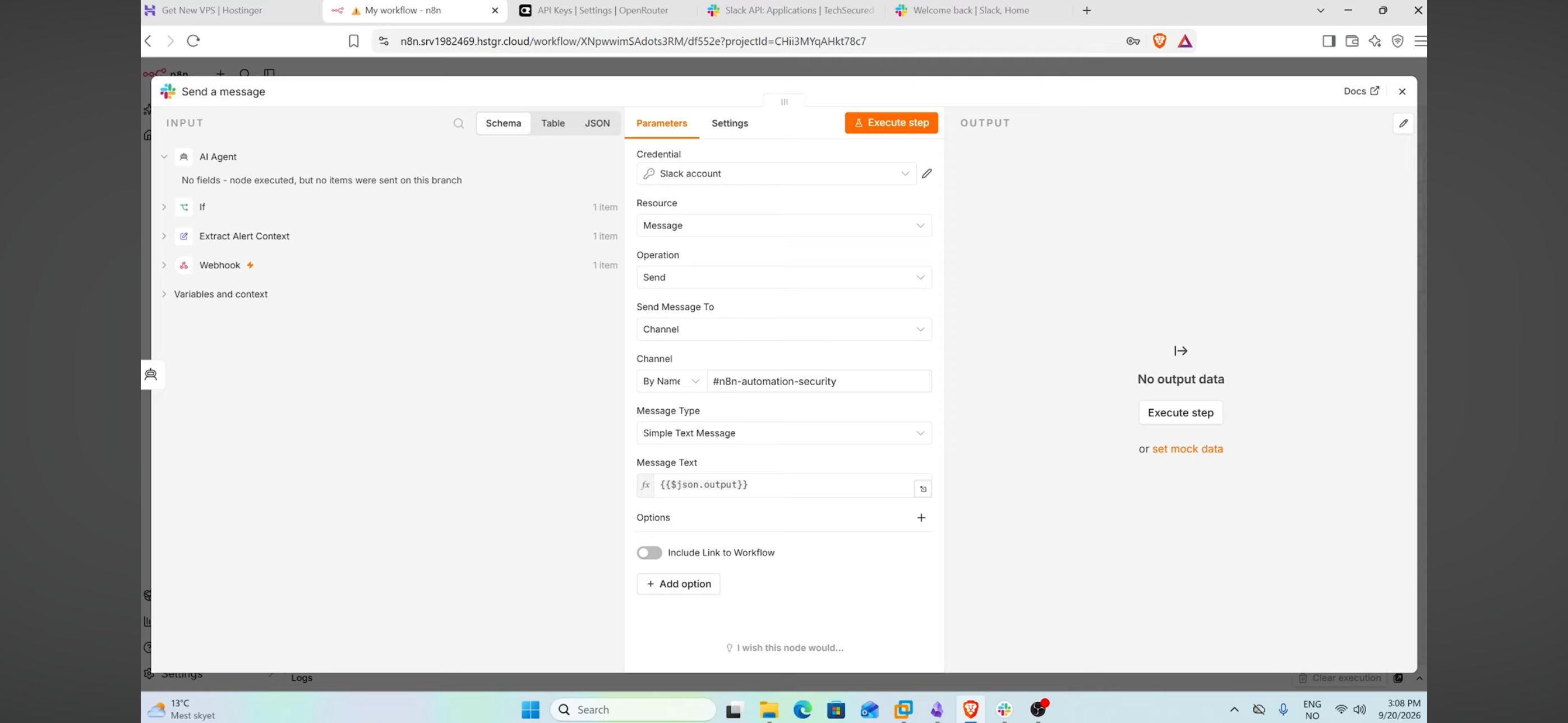
步骤 6:发送到 Slack
一个 Slack → Send a message 节点将 {{ $json.output }}(AI 输出)发布到频道 #n8n-automation-security。Slack 应用使用 bot access token 和一个 signing secret,以 n8n credential 的形式存储(绝不提交到本仓库)。
步骤 7:Wazuh 集成脚本
Wazuh 从 /var/ossec/integrations/ 运行自定义集成。我创建了 custom-n8n,一个小型 Python 脚本,用于读取 Wazuh 传给它的告警文件,并将 JSON POST 到 webhook:
sudo nano /var/ossec/integrations/custom-n8nWazuh 以 <alert_file> <api_key> <hook_url> 调用脚本,因此脚本读取 sys.argv[1](告警文件)和 sys.argv[3](hook URL)。完整代码:integration/custom-n8n。
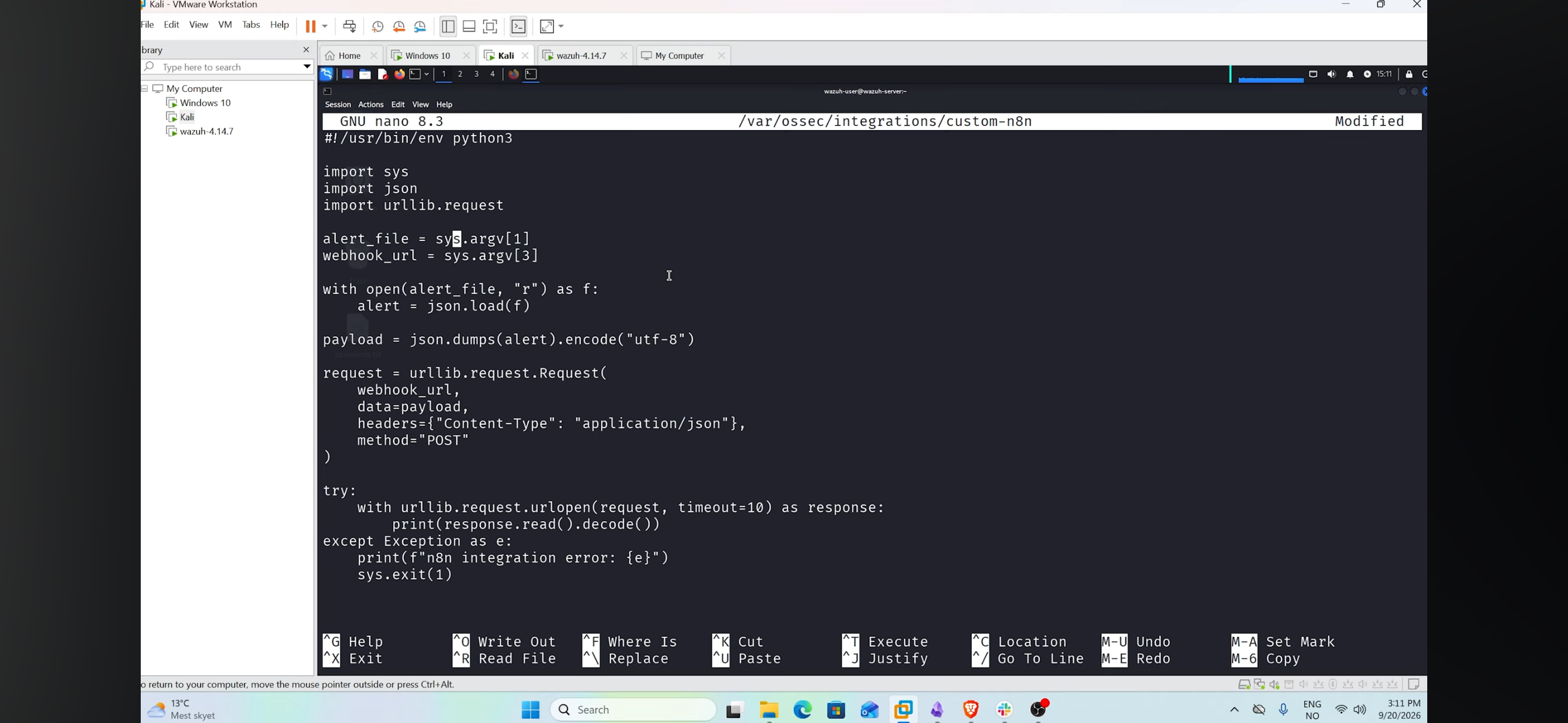 截图 4:在 Wazuh 服务器上用 nano 打开的
 custom-n8n 脚本。
步骤 8:权限
Wazuh 只执行那些所有者为 root、组为 wazuh、且其他用户无访问权限的集成脚本:
sudo chmod 750 /var/ossec/integrations/custom-n8n
sudo chown root:wazuh /var/ossec/integrations/custom-n8n
步骤 9:在 ossec.conf 中注册集成
在 /var/ossec/etc/ossec.conf 中,我在 </ossec_config> 之前添加了一个 <integration> 块(模板:integration/ossec-integration-block.xml):
<integration>
<name>custom-n8n</name>
<hook_url>https://the-n8n-domain/webhook/wazuh-alert</hook_url>
<level>7</level>
<alert_format>json</alert_format>
</integration>之后我进行了重启(sudo systemctl restart wazuh-manager)。
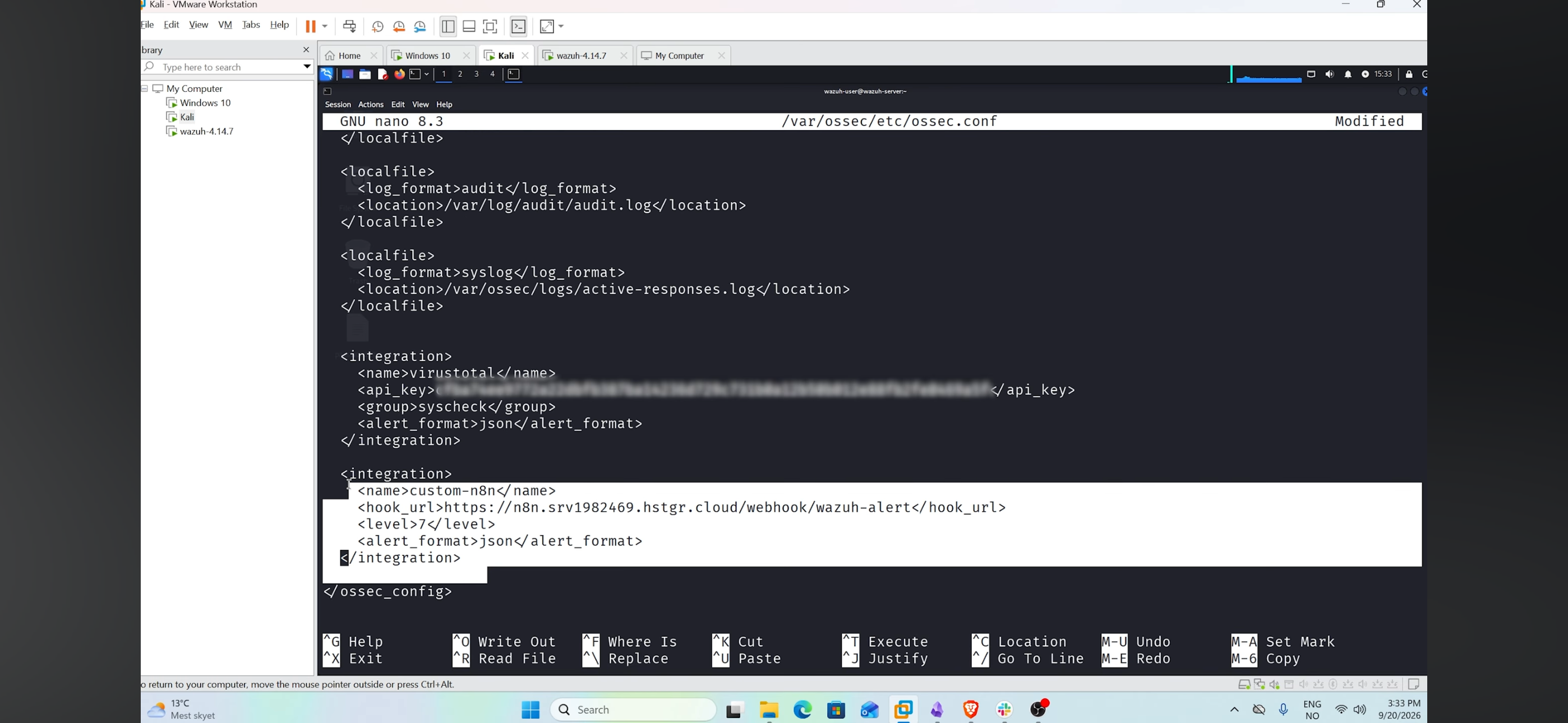 截图 5:
截图 5:ossec.conf 中新增的 custom-n8n 集成块,紧邻现有的 VirusTotal 集成。
5. 测试
为了生成一条真实的告警,我编写了一个无害脚本 testing/Testscript.ps1,它通过 PowerShell -EncodedCommand(UTF-16LE 字符串的 Base64)运行一条命令。编码命令是一种常见的混淆技术(MITRE T1059.001 – Command and Scripting Interpreter: PowerShell),因此对于 SIEM 来说是值得标记的,而这里的 payload 只是 Write-Output "n8n-wazuh-test"。
$cmd = 'Write-Output "n8n-wazuh-test"'
$bytes = [System.Text.Encoding]::Unicode.GetBytes($cmd)
$encoded = [Convert]::ToBase64String($bytes)
powershell.exe -EncodedCommand $encoded
我在 Windows 10 虚拟机上的 PowerShell ISE 中运行了它。
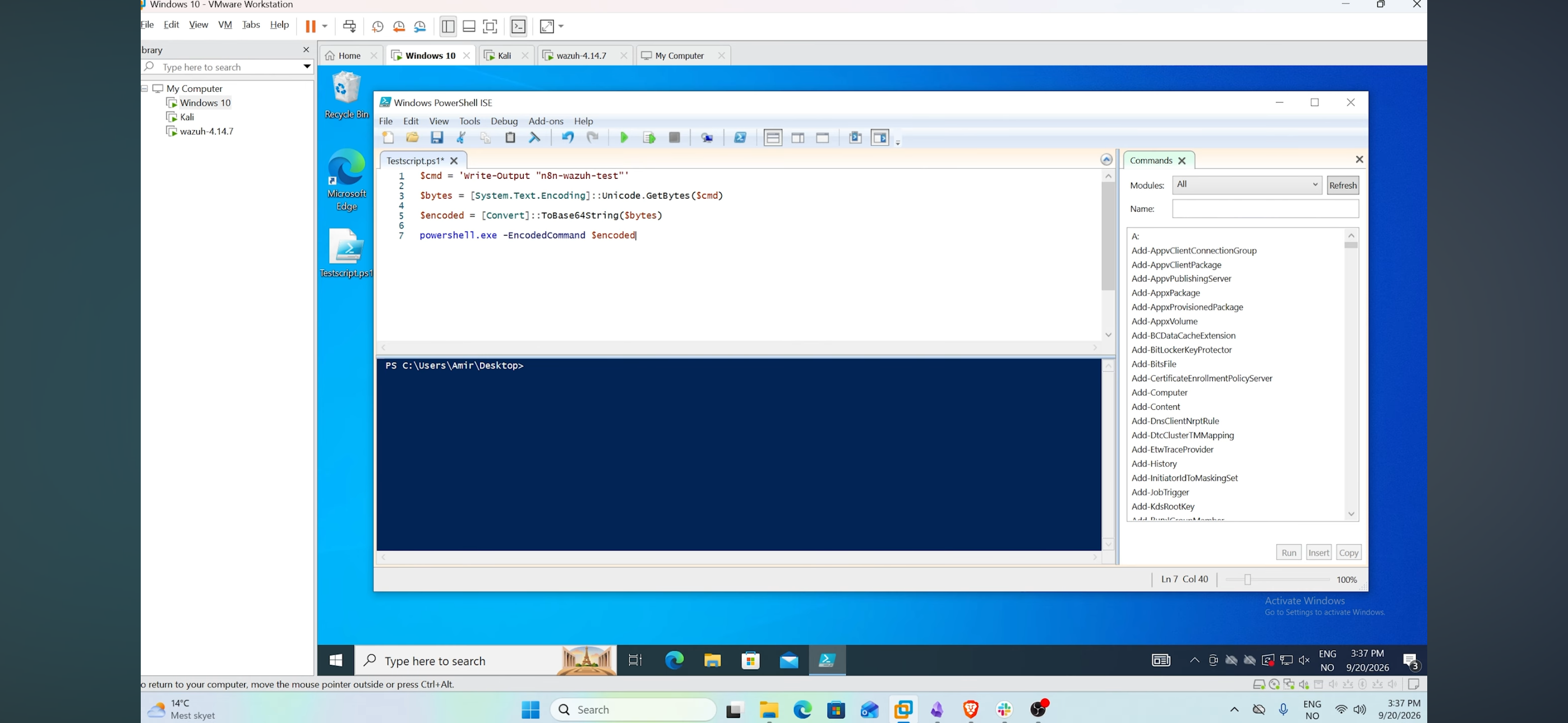
Testscript.ps1 在 Windows 虚拟机上的 PowerShell ISE 中。*
6. 结果
整条链路端到端工作正常:编码的 PowerShell 命令被检测到,由 Wazuh 转发到 n8n,由 AI 总结后发布到 Slack,包含:
- 所涉及的进程和用户,
- 观察到的命令行及其解码内容,
- 它为何重要(编码命令用于隐藏意图,但此处的解码内容是良性的),
- MITRE 技术 T1059.001 – PowerShell,
- 建议操作(与用户确认该脚本是否为经过授权的测试)。
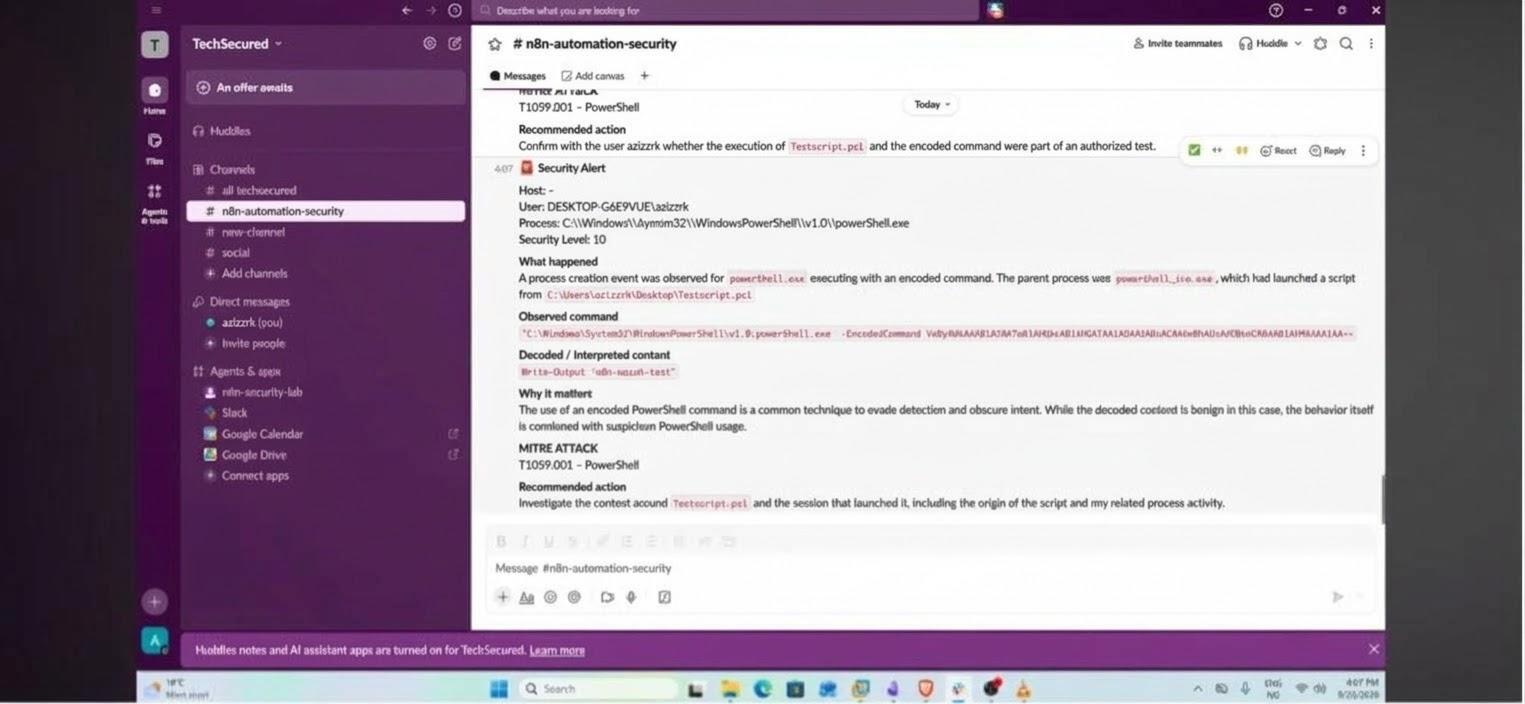 在
在 #n8n-automation-security Slack 频道中由 AI 生成的最终 "Security Alert"。*
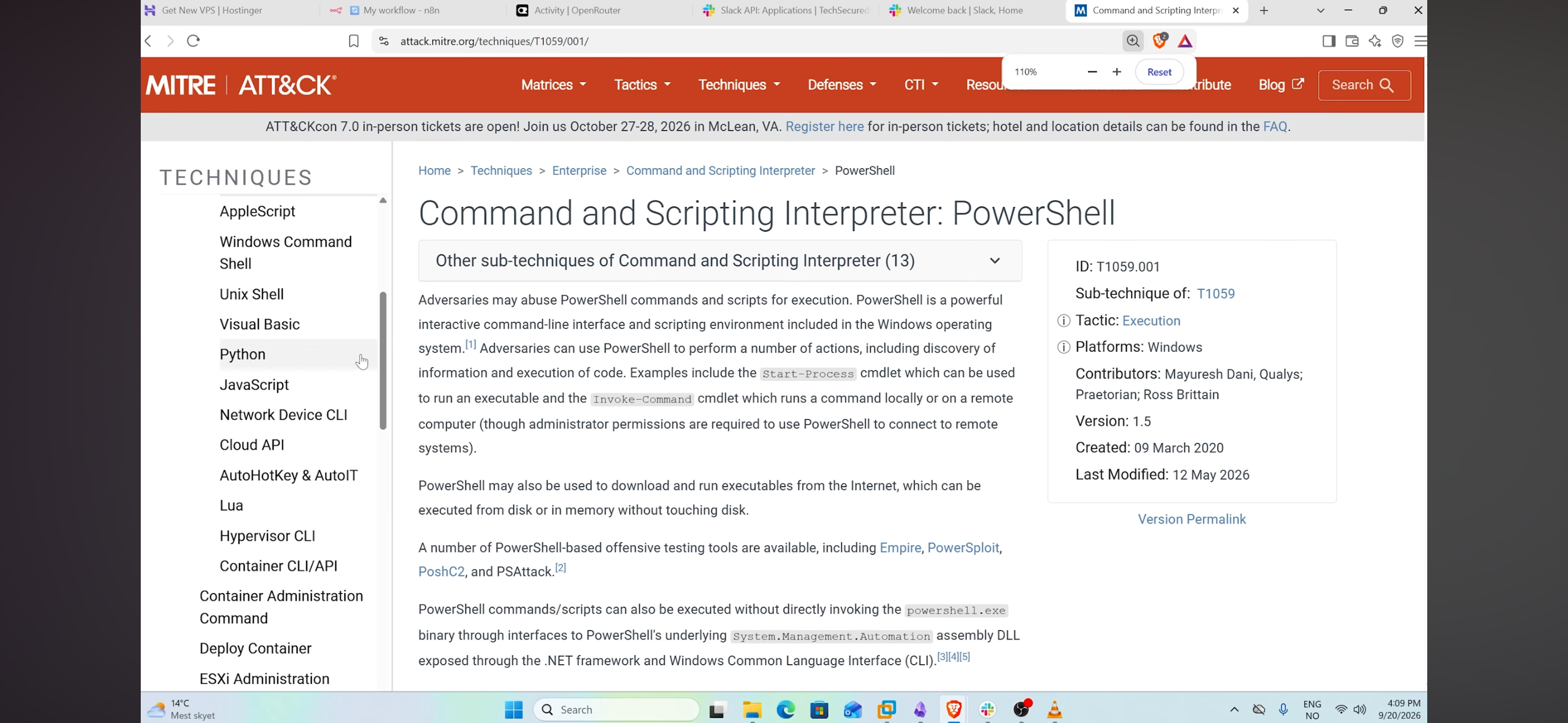
我还针对 T1059.001 查阅了 MITRE ATT&CK 官方网站,以确认 AI 的映射是否准确。
7. 经验教训
- 逐跳单独测试。 先用
curl测试 n8n 可以轻松判断问题不在 Wazuh 端。 - Test URL vs Production URL。 测试 webhook 只在你点击 "Listen" 之后监听一次调用。Wazuh 集成必须使用 Production URL,且工作流必须处于 active 状态。
- prompt 的护栏很重要。 没有 "仅使用提供的事实 / 不要编造" 这一约束,LLM 会愉快地凭空捏造 MITRE 技术或事件 ID。告诉模型缺失字段是正常的,可以得到更值得信任的输出。
- 并非每条告警都包含所有字段。 我的字段映射对某些 Windows 事件字段返回了
undefined,Slack 消息中显示了Host: -。每种事件类型的主机名/用户路径都不同,因此提取逻辑需要根据真实告警进行检查,而不仅仅是 mock 告警。 - 双重阈值。 Wazuh 转发 level ≥ 7 的告警,n8n 仅处理 level ≥ 10。这是一种简单但有效的方式来控制噪音和成本。
- 文件权限是集成的一部分。
custom-n8n上错误的所有者或权限位会让 Wazuh 静默地拒绝运行它。 - 密钥卫生。 API key、Slack token 和 signing secret 存放在 n8n credentials /
ossec.conf中,绝不能推送到 GitHub(我在截图中对 VirusTotal 密钥进行了模糊处理)。
8. 局限性与下一步
- 在 n8n 中添加重试/错误处理,以防 LLM 或 Slack 不可用。
- 告警(IP 信誉、文件哈希)在 AI 步骤之前。
- 添加更多检测用例(暴力破解、新建管理员用户、可疑网络连接)。
确保你所在的公司允许你将数据共享给 LLM。
译文由上游机器翻译生成,可能有误;判断请以英文原文为准。
英文原文(来源本站未改写)
Wazuh → n8n → AI → Slack: Automated SOC Alert Triage Lab
A home-lab project where Wazuh security alerts are automatically sent to an n8n workflow, analysed by an LLM acting as a SOC analyst, and delivered as a clean, structured message in Slack.
Author: Aziz Zarrouk, Computer Science Engineering student (ESPRIT), interested in cybersecurity and automation.
GitHub: Az1zzr
1. Goal
When an analyst gets a raw Wazuh alert (a big JSON blob), they still have to read it, understand it, map it to MITRE ATT&CK and decide what to do. I wanted to automate that first step:
- Wazuh detects something suspicious on an endpoint.
- The alert is forwarded to n8n through a webhook.
- Only alerts above a severity threshold go to the AI.
- The AI writes a short, evidence-based SOC summary.
- The summary is posted to a Slack channel.
2. Architecture
flowchart LR
    A[Windows 10 VM
Wazuh agent
Testscript.ps1] -->|events| B[Wazuh Server 4.14.7
rules + alerts]
    B -->|custom-n8n integration
HTTP POST JSON| C[n8n Webhook
self-hosted on VPS]
    C --> D[Extract Alert Context
Set node]
    D --> E{If
rule level >= 10}
    E -- yes --> F[AI Agent
OpenRouter chat model
SOC analyst prompt]
    E -- no --> X[Ignored]
    F --> G[Slack
#n8n-automation-security]| Component | Role |
|---|---|
| VMware Workstation | Hosts the lab VMs |
| Windows 10 VM | Monitored endpoint, runs the test script |
| Wazuh server 4.14.7 VM | SIEM / detection, runs the custom integration |
| Kali VM | Used as a terminal to administer the Wazuh server |
| n8n (self-hosted on a Hostinger VPS) | Workflow automation |
OpenRouter (deepseek/deepseek-v4-flash) | LLM provider |
| Slack | Alert delivery |
3. Repository structure
.
├── README.md
├── integration/
│   ├── custom-n8n                  # Wazuh integration script (Python)
│   └── ossec-integration-block.xml # Block added to ossec.conf
├── testing/
│   ├── Testscript.ps1              # Encoded PowerShell test (runs on the Windows VM)
│   └── mock-alert.sh               # Fake alert to test the webhook alone
└── screenshots/                    # 7 numbered screenshots used below
4. Setup, step by step
Step 1: Create the n8n webhook
In n8n I added a Webhook node:
- HTTP method:
POST - Path:
wazuh-alert - Respond:
Immediately
n8n gives two URLs: a Test URL (/webhook-test/...) and a Production URL (/webhook/...). The Wazuh integration uses the production one.
Screenshot 1: Webhook node configured with POST and the path wazuh-alert, with the Production URL selected.
Step 2: Test the webhook with a fake alert
Before touching Wazuh, I checked the n8n side by sending a mock alert with curl from the Windows VM (see testing/mock-alert.sh).
The first call returned a 404 ("webhook not registered"), because in test mode the webhook only listens once, after clicking Execute workflow / Listen for test event. After clicking it, the second call returned {"message":"Workflow was started"}.
Screenshot 2: First call gives 404 (not listening), second call returns "Workflow was started".
Step 3: Extract the useful fields (Set node "Extract Alert Context")
The raw Wazuh alert is large, so a Set node keeps only what the AI needs: rule id, rule level, description, event id, provider, user, process, command line, parent process, target file, process ids, MITRE technique and raw message. Expressions look like {{ $json.body.rule.description }}.
Fields that don't exist in a given alert come out as undefined. That is normal, since different event types contain different fields, and the prompt is written to handle it.
Step 4: Filter by severity (If node)
An If node keeps only alerts where rule.level >= 10. Lower-level noise never reaches the AI, which saves API cost and avoids flooding Slack.
Step 5: AI analysis (AI Agent + OpenRouter)
An AI Agent node uses an OpenRouter Chat Model (deepseek/deepseek-v4-flash) with a SOC analyst prompt. The important design choices in the prompt:
- Use only facts present in the alert fields.
- Do not invent MITRE techniques, event IDs, processes, users or commands.
- Treat null / undefined / empty fields as missing information, never infer them.
- Clearly separate observed evidence from analysis.
- Output a fixed Slack-friendly (mrkdwn) structure: Host, User, Process, Severity, What happened, Observed command, Decoded content, Why it matters, MITRE ATT&CK, Recommended action.
Screenshot 3: The prompt expression in n8n (left) and the output template preview (right).
Step 6: Send to Slack
A Slack → Send a message node posts {{ $json.output }} (the AI result) to the channel #n8n-automation-security. The Slack app uses a bot access token and a signing secret stored as an n8n credential (never committed to this repo).
Step 7: The Wazuh integration script
Wazuh runs custom integrations from /var/ossec/integrations/. I created custom-n8n, a small Python script that reads the alert file Wazuh gives it and POSTs the JSON to the webhook:
sudo nano /var/ossec/integrations/custom-n8nWazuh calls the script with <alert_file> <api_key> <hook_url>, so the script reads sys.argv[1] (alert file) and sys.argv[3] (hook URL). Full code: integration/custom-n8n.
Screenshot 4: The custom-n8n script open in nano on the Wazuh server.
Step 8: Permissions
Wazuh only executes integration scripts that are owned by root with group wazuh, and not world-accessible:
sudo chmod 750 /var/ossec/integrations/custom-n8n
sudo chown root:wazuh /var/ossec/integrations/custom-n8n
Step 9: Register the integration in ossec.conf
In /var/ossec/etc/ossec.conf I added an <integration> block just before </ossec_config> (template: integration/ossec-integration-block.xml):
<integration>
  <name>custom-n8n</name>
  <hook_url>https://the-n8n-domain/webhook/wazuh-alert</hook_url>
  <level>7</level>
  <alert_format>json</alert_format>
</integration>
I restarted afterwards (sudo systemctl restart wazuh-manager).
*Screenshot 5: The new custom-n8n integration block in ossec.conf, next to the existing VirusTotal integration .
5. Testing
To generate a realistic alert I wrote a harmless script, testing/Testscript.ps1, that runs a command through PowerShell -EncodedCommand (Base64 of a UTF-16LE string). Encoded commands are a common obfuscation technique (MITRE T1059.001 – Command and Scripting Interpreter: PowerShell), so they are a good thing for a SIEM to flag, while the payload here is only Write-Output "n8n-wazuh-test".
$cmd = 'Write-Output "n8n-wazuh-test"'
$bytes = [System.Text.Encoding]::Unicode.GetBytes($cmd)
$encoded = [Convert]::ToBase64String($bytes)
powershell.exe -EncodedCommand $encoded
I ran it in PowerShell ISE on the Windows 10 VM.
Testscript.ps1 in PowerShell ISE on the Windows VM.*
6. Results
The full chain worked end to end: the encoded PowerShell command was detected, forwarded by Wazuh to n8n, summarised by the AI and posted in Slack with:
- the process and user involved,
- the observed command line and its decoded content,
- why it matters (encoded commands are used to hide intent, but the decoded content here is benign),
- the MITRE technique T1059.001 – PowerShell,
- a recommended action (confirm with the user whether the script was an authorised test).
The final AI-generated "Security Alert" in the #n8n-automation-security Slack channel.*
I also checked the technique ID against the official MITRE ATT&CK page for T1059.001 to confirm the AI's mapping was right.
7. Lessons learned
- Test each hop separately. Testing n8n with
curlfirst made it easy to know the problem was not on the Wazuh side. - Test URL vs Production URL. The test webhook only listens for one call after you click "Listen".The Wazuh integration must use the production URL and the workflow must be active.
- Prompt guardrails matter. Without "only use provided facts / don't invent", LLMs happily make up MITRE techniques or event IDs.Telling the model that missing fields are normal gave much more trustworthy output.
- Not every alert has every field. My field mappings returned
undefinedfor some Windows event fields, and the Slack message showedHost: -.
The hostname/user paths differ per event type, so the extraction needs to be checked against real alerts, not only mock ones.
5. Two thresholds. Wazuh forwards level ≥ 7, n8n only processes level ≥ 10.It is a simple but effective way to control noise and cost.
6. File permissions are part of the integration. A wrong owner or mode on custom-n8n means Wazuh silently refuses to run it.
7. Secrets hygiene. API keys, Slack tokens and signing secrets live in n8n credentials / ossec.conf and must never be pushed to GitHub (I blurred the VirusTotal key in a screenshot).
8. Limitations and next steps
- Add retries/error handling in n8n if the LLM or Slack is unavailable.
- alerts (IP reputation, file hashes) before the AI step.
- Add more detection use cases (brute force, new admin user, suspicious network connections).
make sure the company you work for allow you sharing the data to the llm
这条还缺什么证据?
下面每条都由本条已有字段推出(等级、理由、商业模式、来源次数、是否演示), 本站不生成推测性结论;通用验证方法放在方法论页。
- 可核验的收入或付费证据查官网定价页与付费口径;第三方数据源(如 GetLatka)只作旁证,需标注来源与时点。
- 商业模式未定确认按席位/按用量/授权还是开源托管版收费;开源项目另查 LICENSE 与是否存在付费版。
- 只有单一来源找一手站点或其他渠道是否重复出现同一产品;社区热帖数量不等于商业进展。
通用验证清单(谁有这个问题/谁愿意付费/一个人能交付哪一小步)见我们的筛选方法。